
A points scheme is easy to describe and surprisingly easy to get wrong. Points earned on postage, points kept after an order is cancelled, a discount that ends up paying for delivery: each of those costs a shop money, and each is the kind of thing a customer notices before you do.
Our Reward Points and Loyalty Scheme plugin is built around getting those details right, with no code edits to your store.
How customers earn
You set two figures: how much a customer spends to earn one point, and what one point is worth at the checkout. The admin screen turns them into plain English, for example “spending £100.00 earns 100 points, and 100 points takes off £5.00, an effective discount of 5%”.

The scheme summary states what your settings mean in pounds and percent.
Click for full sized image
Points are earned on the goods value of the order only. Delivery and tax never earn. They become usable when the order reaches the status you choose, Completed by default or Processing if you prefer, and never at Pending, so nobody is rewarded for an order that has not been paid.
The product page can show what an item will earn before it is bought. That figure comes from the same code that awards the points, so what is quoted is what is given.
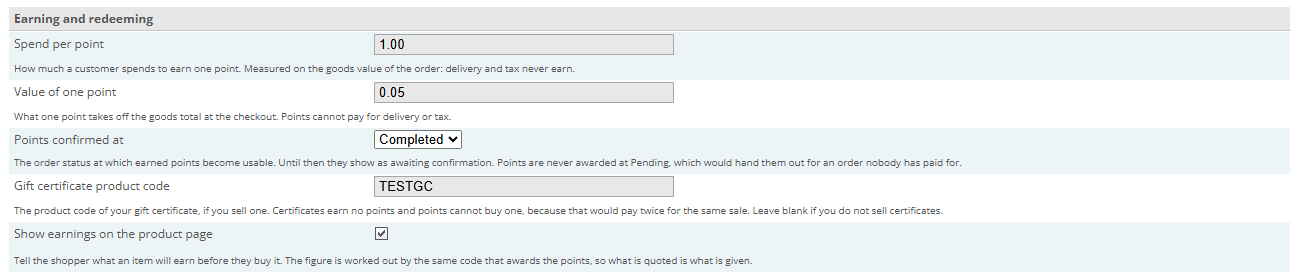
Earning and redeeming: two figures and a status are all a scheme needs.
Click for full sized image
Earning without buying
You can also award points for registering an account, for confirming a newsletter subscription, and for leaving a product review. Each is awarded once. Review points are given when the review is submitted, so if you moderate reviews and do not want that, set it to 0.
Spending them at the checkout
Redemption is applied as a discount that CubeCart calculates itself, so it combines correctly with a discount code or a gift certificate. Points can never pay for delivery or tax, and can never take off more than the goods are worth. Gift certificates neither earn points nor can be bought with them, because that would pay twice for the same sale.
When an order goes wrong
If an order is later declined, failed or cancelled, the points come back to the customer automatically. Points are spent oldest first, and a refund restores them with the expiry date they originally had, rather than quietly giving them a longer life.
Expiry and reminders
Points can last for a set number of days, or never expire. Two optional emails help: a warning a set number of days before points expire, and a reminder to a customer who has had no points activity for a while. Both can share your store’s bulk send allowance, so a large run goes out in small batches over several hours. Order confirmations are never held up behind them.
All of this runs from CubeCart’s own scheduler, under Maintenance then Cron Jobs, so there is no extra cron line to set up.
Different rates for different things
An individual product or a whole category can override the store rate, with a fixed number of points per unit or a rate of its own. A product override beats a category override, which beats the store rate. A customer group can have a better rate, so your trade or regular customers earn faster.
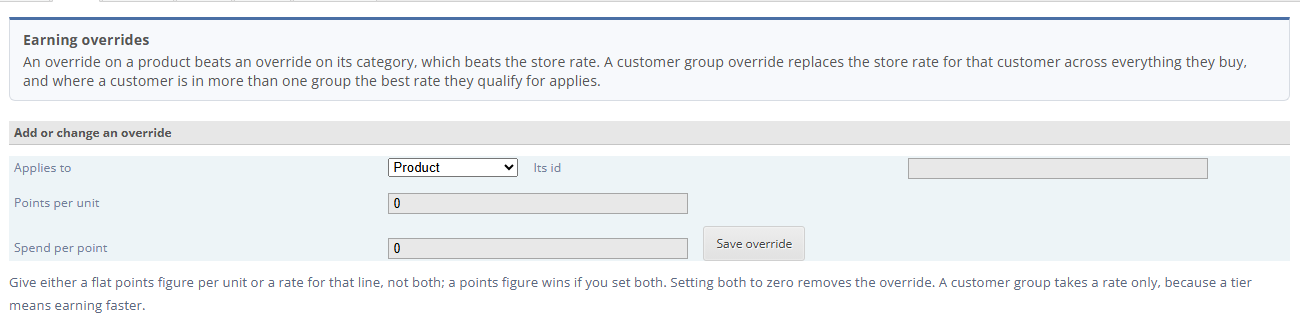
Overrides by product, category or customer group.
Click for full sized image
What you see in the admin
A searchable list of every customer with points, each with their own statement. Manual adjustments come with a note that appears on the customer’s statement, and a whole customer group can be adjusted in one go. There is a filterable ledger with CSV export.
If you are switching the scheme on part way through, you can award points for orders already placed, and running that twice cannot pay anyone twice. Moving from another rewards plugin? The importer reads its tables and tells you exactly what it can bring across. Points with no expiry date of their own get six months.
What your customers see
Their balance on the basket page and their account page, plus a statement listing every movement and when each block of points expires.
Who it is for
Any shop with repeat customers. It pays for itself most clearly where people come back regularly for consumables, gifts or trade supplies, and where a 5% reward is cheaper than the advertising it would take to win a new customer.
Getting it
It needs CubeCart 6.7.6 or later. It is available from our CubeCart plugins range, or you can add Reward Points and Loyalty Scheme to your basket directly.
If you want to check it fits your store before buying, open a ticket and ask us.
