
Most Mailchimp connections only push email addresses one way. The trouble starts afterwards: someone unsubscribes in Mailchimp and keeps receiving your store’s emails, a customer changes address and appears twice, a deleted order keeps counting towards a campaign’s revenue.
Our Mailchimp Integration plugin keeps CubeCart and Mailchimp in step in both directions, and sends Mailchimp the shopping data its automations run on.
Who goes into your audience
Newsletter sign-ups, account registrations and checkout opt-ins go into the audience you choose. Each contact carries first and last name, phone, country, order count and lifetime spend as merge fields. That last pair is what lets you segment on buying behaviour rather than on an email address alone. Contacts can also be tagged with their customer group and whether they have ordered.
Unsubscribes both ways
Unsubscribe in CubeCart and the contact is unsubscribed in Mailchimp. Unsubscribe in Mailchimp, or have an address cleaned or changed there, and a webhook writes it back to CubeCart. The two lists cannot drift apart.
Baskets, orders and abandoned carts
Products, customers, orders and live baskets go to Mailchimp’s e-commerce API, which is what abandoned cart emails and purchase-based automations need. The basket is removed from Mailchimp the moment the order is placed, so nobody is chased for a cart they have already paid for.
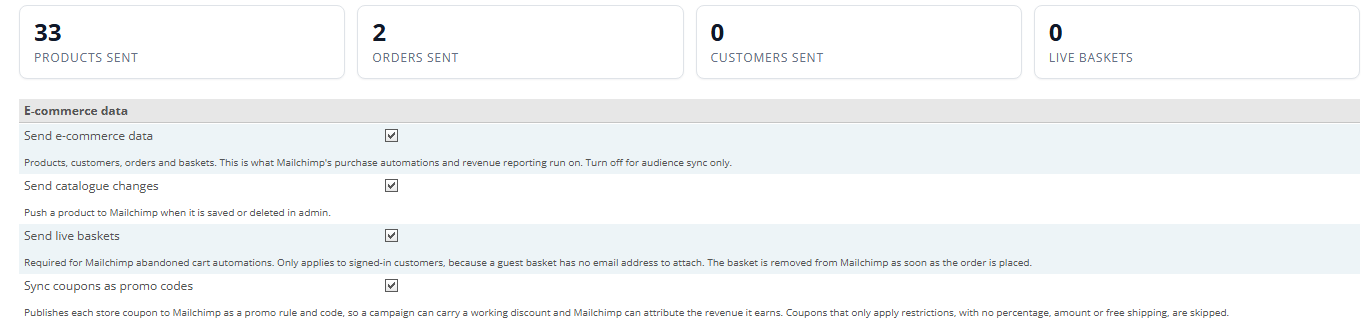
What goes to Mailchimp's e-commerce side, each part switchable.
Click for full sized image
Discount codes that work in a campaign
Your store’s coupons are published to Mailchimp as promo codes. A campaign can carry a discount that works at your checkout, and Mailchimp can report what each code earned. Revenue and orders attributed to each campaign come back into the CubeCart admin.

Campaign results read back from Mailchimp, without leaving CubeCart.
Click for full sized image
Keeping it tidy
Delete a customer and their contact is archived, or permanently erased when you need a GDPR erasure. A customer who changes their email address has their existing contact moved, not duplicated. Delete an order and it is removed from Mailchimp, so campaign revenue stops counting it.
It never slows the checkout
Every call to Mailchimp is queued and sent by a background task from CubeCart’s own scheduler. A slow or unavailable Mailchimp never delays a checkout, and failures are retried rather than lost. If CubeCart’s own Mailchimp plugin is installed, this one switches it off so the two do not both sync.
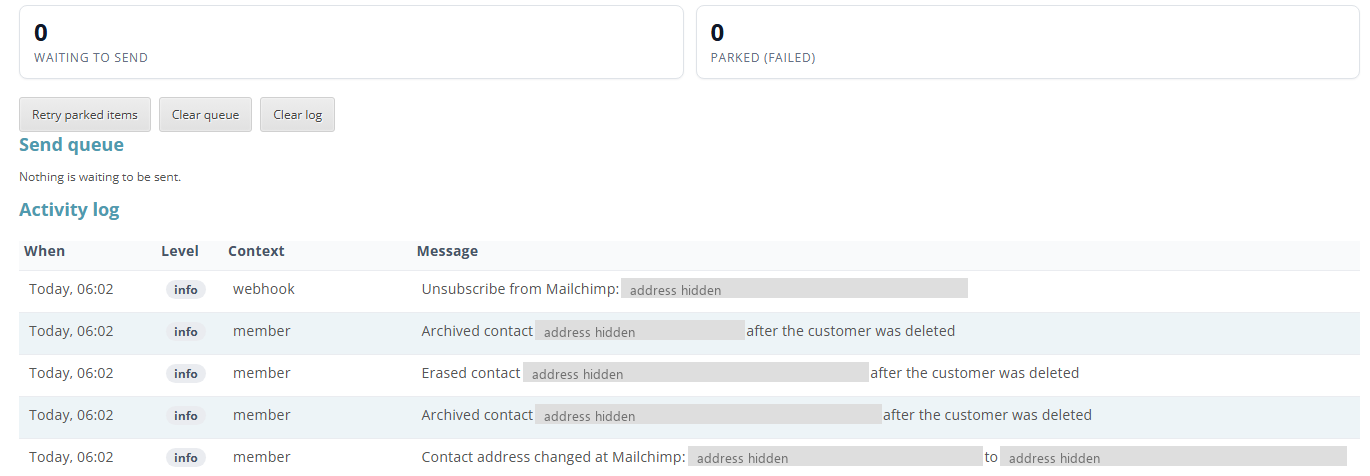
The queue and the log: every change on either side, recorded.
Click for full sized image
Who it is for
Any CubeCart store that sends email campaigns, and anyone who wants abandoned cart emails or wants to see which campaign earned what.
Getting it
It needs CubeCart 6.7.6 or later. It is available from our CubeCart plugins range, or you can add Mailchimp Integration to your basket directly.
If you want to check it suits how you use Mailchimp, open a ticket and ask us.
