robots.txt tells search engines which parts of your site to crawl. It is easy to write one that quietly removes you from Google.
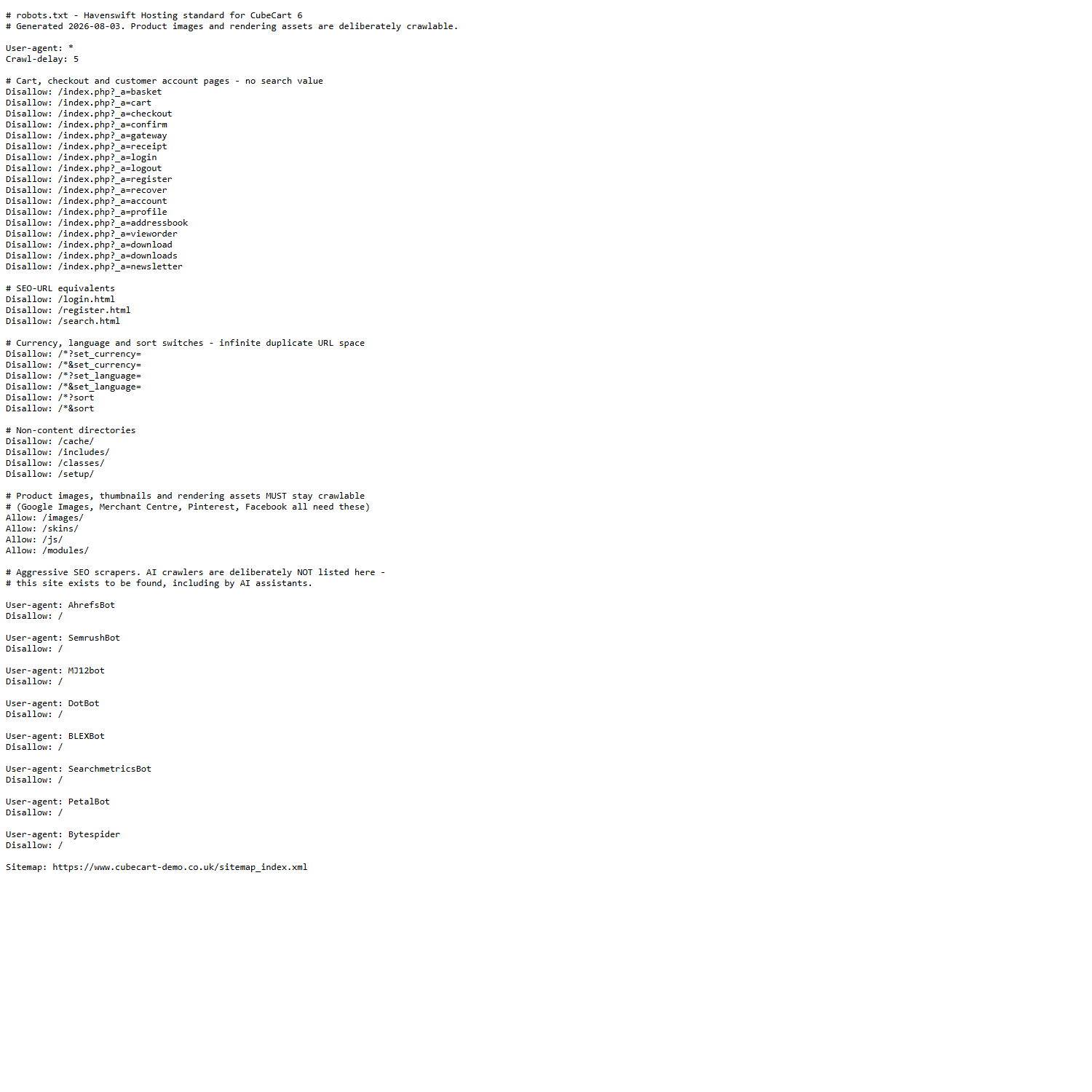
A working robots.txt for a CubeCart store: basket, checkout and account pages blocked, product images and skin assets left crawlable
What to block
Pages that are personal to a visitor or that generate infinite variations:
- Basket, checkout and order pages
- Customer account pages
- Login and password reset pages
- Internal search results
- Filter and sort URLs that produce endless combinations of the same products
What you must never block
This is where real damage is done. Do not block your images, stylesheets, scripts or skin folders. Google renders your pages like a browser. If it cannot load the CSS and JavaScript, it sees a broken page and judges it accordingly – and blocked product images cannot appear in image search or shopping results at all.
Blocking /images/, /skins/, /js/ or /modules/ is a common and damaging mistake.
Include your sitemap
Add a line pointing at your sitemap so crawlers can find it.
It is not a security control
robots.txt is a request, and the file is public. Never use it to hide an admin area or anything sensitive – you are publishing a list of the places you would rather nobody looked. Use real access controls for that.
After changing it
If your site is behind a content delivery network, robots.txt may be cached at the edge for some time, so your change will not be visible immediately. Test it in Google Search Console once it has updated.
