What Is an XML Sitemap and Why Does Your Site Need One
An XML sitemap is a file that lists the pages on your website and hands that list directly to search engines. It is one of the least glamorous things you can do for your site’s visibility, and one of the few that takes minutes rather than months.
It is also one of the easiest things to get quietly wrong. We recently found a site where two plugins were fighting: one had switched off WordPress’s built-in sitemap on the assumption it would provide its own, and its own was disabled. The result was a site with no sitemap at all, and nobody had noticed for months.
What a sitemap actually does
Search engines find pages by following links. That works well for a well linked site and badly for everything else. Pages that are only reachable through a search box, deep in pagination, or newly published with nothing linking to them yet can go unnoticed for a long time.
A sitemap short circuits that. It says: here is every page I want you to know about, here is when each one last changed. Google and Bing both read it. It does not guarantee indexing, and it does not improve your rankings directly. What it does is make sure the crawler knows your pages exist, which is a precondition for everything else you do for search.
For an e-commerce site this matters more than for a blog. A shop with a thousand products, filtered categories and paginated listings has a lot of pages that are awkward to reach by crawling alone.
What a sitemap does and does not do
It does help search engines find your pages. Any page that is not linked to from somewhere they already know about is difficult for them to reach, and a sitemap gives them the list directly.
It does help with large or deep sites. On a shop with thousands of products, some pages are many clicks from the home page. A sitemap puts them all on an equal footing.
It does help with a new site. A site with few inbound links has little for a crawler to follow, and a sitemap submitted to the search engines is the fastest way to be discovered.
It does not guarantee indexing. Listing a page is a suggestion, not an instruction. Search engines decide independently whether a page is worth including, and thin or duplicate pages will be skipped regardless.
It does not improve rankings by itself. A sitemap affects discovery, not quality. Anyone selling you a sitemap as a ranking service is selling you something else.
What a good sitemap contains
A sitemap is plain XML. Each entry has a URL and, usually, a last modified date:
<url>
  <loc>https://www.example.co.uk/product/blue-widget/</loc>
  <lastmod>2026-08-01</lastmod>
</url>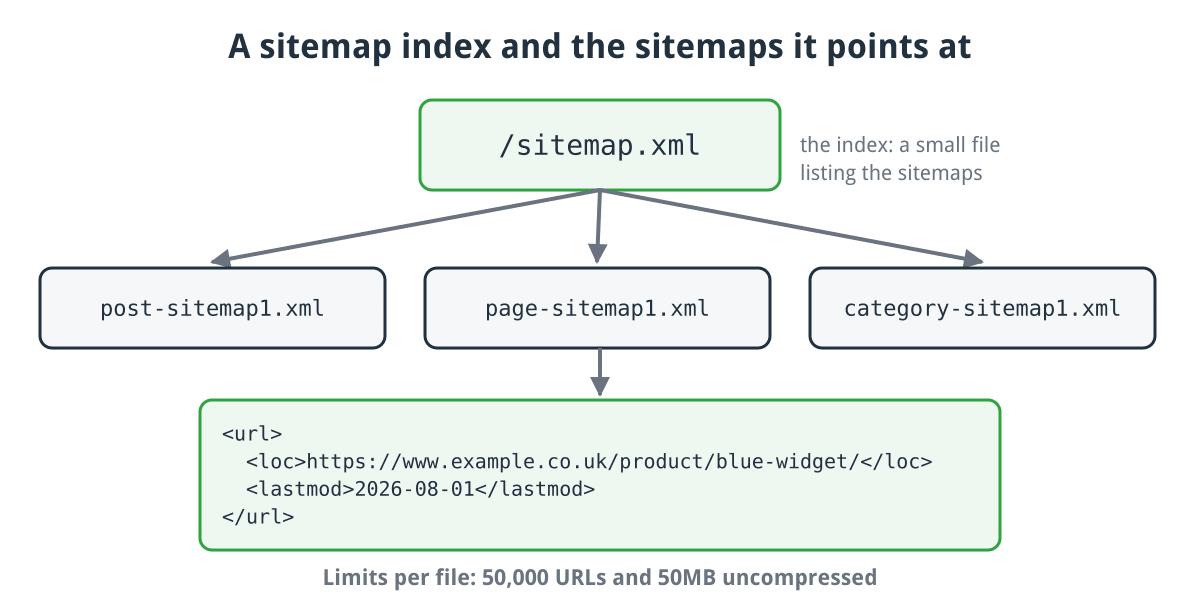
A sitemap index pointing at separate sitemaps, and the entry each one contains per URL.
Click for full sized image
Larger sites use a sitemap index: a small file pointing at several sitemaps, typically split by content type. That is what most modern plugins generate, and it is why you may see /sitemap.xml listing post-sitemap1.xml, page-sitemap1.xml and so on.
The limits are 50,000 URLs and 50MB uncompressed per file. If you exceed either, split into multiple files behind an index.
The rules worth knowing
Only include pages you actually want indexed. This is the one people get wrong. If a URL is in your sitemap but carries a noindex tag, you are giving search engines contradictory instructions. Same for pages blocked in robots.txt, canonicalised to another URL, or returning anything other than a 200. The same goes for redirects, error pages, admin and basket pages, and internal search results.
Keep lastmod honest. Some plugins stamp every URL with today’s date on every regeneration. Search engines learn to distrust that, and you lose the benefit of the signal for pages that genuinely did change.
Use absolute URLs, and use the same protocol and hostname as your canonical URLs. Mixing http and https, or www and non-www, wastes crawl budget. One entry per page, using the address you actually want indexed.
Exclude what is not a page. Tag archives with one post, author pages on a single author site, internal search results and navigation fragments do not need to be there.
Keep it accurate. A sitemap listing URLs that return 404 wastes crawl budget and reduces the weight given to the rest of it.
How to generate one
How you generate a sitemap depends on what the site runs on, and in almost every case you should not be creating it by hand.
WordPress has generated sitemaps natively since version 5.5, at /wp-sitemap.xml. Most SEO plugins replace it with their own, which is fine, but be aware that the replacement is a two step process: disable the native one, enable your own. If a plugin does the first and not the second you end up with nothing, and no error to tell you. It is also worth confirming that WP-Cron is actually running, because much of what an SEO plugin does happens in the background on a schedule.
CubeCart generates a sitemap from the admin, covering your categories, products and documents, and since 6.6.0 it can rebuild it automatically on a schedule rather than only when you remember. That is worth enabling, because a stale sitemap on a shop with changing stock is worse than useless.
WooCommerce, OpenCart and Magento stores are covered either by the platform itself or by a widely used extension. In each case check that product and category pages are actually included, because that is the half that matters on a shop.
A hand built or bespoke site can use one of the free online generators, which crawl the site and produce a file for you. This works, but it produces a static file that is out of date the moment you add a page, so it suits sites that rarely change.
Telling search engines where it is
Two things to do, and most sites only do one.
First, add a Sitemap: line to your robots.txt. It is one line, every crawler reads it, and it saves registering with each search engine separately:
Sitemap: https://www.example.co.uk/sitemap.xmlSecond, submit it in Google Search Console and Bing Webmaster Tools. Submission gives you something the robots.txt line does not: a report showing how many URLs were discovered, how many were indexed, and why the rest were not. That report is the actual value, and it is one of the more useful free diagnostics available for a website.
Checking yours works
Four checks, none of which take long.
- Load it. Visit
/sitemap.xml. If you get a 404, you do not have one, whatever your plugin settings claim. - Count it. Compare the number of URLs against your rough page and product count. A sitemap listing 26 URLs for a 4,000 product shop is broken, not tuned.
- Check robots.txt. Load
/robots.txtand confirm theSitemap:line is there. - Read the Search Console report. Look at discovered versus indexed, and at the reasons given for exclusions.
Do these after any plugin change. Sitemap generation is exactly the sort of thing that breaks silently during an unrelated update.
Then check it occasionally rather than never. Two things are worth watching: whether the sitemap still generates after a platform upgrade, and whether the indexed count is drifting away from the submitted count. A large and growing gap usually means pages are being judged thin or duplicate, which is a content problem a sitemap cannot fix.
Common mistakes
- A sitemap left behind after a site move, still listing the old URL structure or the
http://version of every page. - Blocking the sitemap in robots.txt by accident, usually as collateral damage from blocking a directory.
- Including every URL variation: filtered category pages, session parameters and sort orders, which produce large numbers of near duplicate entries.
- Two sitemaps competing, where a plugin generates one and the platform generates another and they disagree about what exists.
- Assuming a sitemap will fix an indexing problem. If pages are not being indexed despite being in the sitemap, the sitemap is not the issue.
What a sitemap will not do
It will not make a page rank. It will not get a thin or duplicate page indexed. It will not compensate for a site that is slow, broken or blocked in robots.txt. Search engines treat it as a hint, not an instruction.
What it does is remove one specific failure mode: pages that never get found because nothing links to them clearly enough. For most sites that is a handful of pages. For a shop with deep catalogue structure it can be a great many.
If you host with us and want your sitemap checked, or you are not sure whether the one you think you have actually exists, get in touch and we will take a look.
