SPF, DKIM and DMARC: Getting Your Email Delivered
If your order confirmations land in spam, or your contact form emails never arrive, the cause is usually not your mail server. It is that the receiving server cannot verify you are allowed to send mail for your domain.
SPF, DKIM and DMARC are the three records that answer that question. They live in your DNS, they take an afternoon to set up properly, and getting them right is the single biggest thing most site owners can do for email deliverability.
The problem they solve
Email was designed without authentication. Anyone can connect to a mail server and claim to be sending from your domain. That is how phishing works: an email that appears to come from your shop, asking your customers for card details.
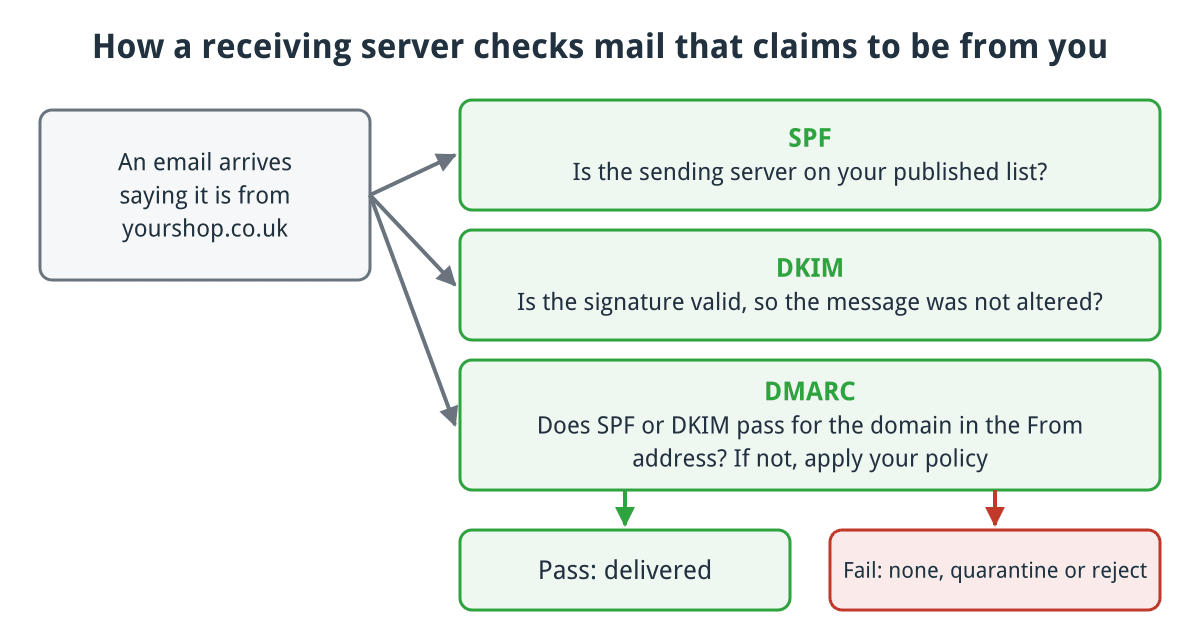
The three checks a receiving server makes, and what DMARC tells it to do when they fail.
Click for full sized image
Receiving servers therefore have to guess whether mail claiming to be from you actually is. SPF, DKIM and DMARC turn that guess into a check.
SPF: which servers may send
SPF is a TXT record listing the servers permitted to send mail for your domain. A typical one:
v=spf1 +a +mx +ip4:203.0.113.10 include:_spf.google.com ~allRead left to right: allow the domain’s own A record, allow its MX servers, allow that specific IP, allow whatever Google’s SPF record allows, and treat everything else as a soft fail.
The ending matters. ~all is a soft fail, meaning “probably not us, but accept and mark it”. -all is a hard fail, meaning “definitely not us, reject it”. -all is stronger but unforgiving: if you forget a sender, its mail stops arriving. Start with ~all, confirm everything legitimate passes, then tighten.
The trap: SPF has a hard limit of ten DNS lookups. Each include: counts, and includes can nest. Stack up Google, a mailing list provider, a CRM and a helpdesk and you quietly exceed ten, at which point the whole record is invalid and everything soft fails. Use an SPF checker to count your lookups; do not assume.
You may only have one SPF record. Two TXT records both starting v=spf1 is a permanent error. Merge them.
DKIM: proof the message was not altered
DKIM signs outgoing mail with a private key held by your mail server. The matching public key sits in DNS. The receiver verifies the signature and knows two things: the message genuinely came from a server holding your key, and it has not been modified in transit.
The public key is published on a selector, so you can run several keys at once:
default._domainkey.example.co.uk TXT "v=DKIM1;k=rsa;p=MIIBIjANBgkq..."DKIM is stronger than SPF because it survives forwarding. If someone forwards your email, SPF breaks (the forwarding server is not in your record) but the DKIM signature still validates.
In cPanel, DKIM is generated for you under Email Deliverability. If you send through a third party such as Mailgun or SendGrid, they issue their own keys on their own selectors, and you add those records too. Multiple selectors is normal and correct.
DMARC: what to do when checks fail
SPF and DKIM report a result. DMARC tells the receiver what to do with it, and asks for a report back.
_dmarc.example.co.uk TXT "v=DMARC1; p=quarantine; rua=mailto:[email protected]"The policy p= takes three values: none (do nothing, just report), quarantine (treat as spam) and reject (refuse delivery).
DMARC also requires alignment: the domain that passes SPF or DKIM must match the domain in the visible From address. This is why mail can pass SPF and still fail DMARC. A mailing list sending as your address but authenticating as its own domain passes SPF and fails alignment.
The order to do this in
Do not start at p=reject. You will block your own mail.
- Inventory your senders. Web server, mail server, newsletter tool, CRM, helpdesk, invoicing, payment gateway notifications. Everything that sends as your domain.
- Publish SPF covering all of them, ending
~all. Check you are under ten lookups. - Enable DKIM on each sender that supports it, and publish each selector.
- Publish DMARC at
p=nonewith aruaaddress. This changes nothing about delivery and starts the reports flowing. - Read the reports for a few weeks. They are XML and ugly; a free DMARC report viewer makes them readable. You are looking for legitimate senders that are failing.
- Fix what fails, then tighten to
quarantine, and laterrejectonce clean.
That sequence takes weeks rather than an afternoon, but it is the only way to reach reject without losing mail.
Why this matters more each year
Google and Yahoo introduced bulk sender requirements in 2024 mandating SPF, DKIM and DMARC for anyone sending significant volume. The direction of travel is clear: unauthenticated mail is increasingly treated as suspect regardless of volume.
For a shop this is not abstract. Order confirmations, dispatch notices and password resets are transactional mail your customers need. If those land in spam you generate support tickets, and eventually chargebacks from people who believe their order never went through. The same goes for abandoned cart reminders, which cannot recover a sale if they never arrive.
Checking what you have
Query your DNS directly:
dig +short TXT example.co.uk
dig +short TXT default._domainkey.example.co.uk
dig +short TXT _dmarc.example.co.uk
Then send a message to one of the free mail testers, which will report SPF, DKIM and DMARC results together and show you exactly which alignment check failed if one did.
If you host with us and want your records reviewed, or your DMARC reports are arriving and you cannot make sense of them, send them over and we will go through them with you.
