Two-Factor Authentication in CubeCart: Why You Should Turn It On Today
Two factor authentication arrived in CubeCart 6.6.0. If you have staff, contractors or anyone other than yourself with a back office login, this is the most valuable thing you can turn on after upgrading, and it takes about five minutes per account.
Why this matters more than it used to
Look at what CubeCart fixed across 6.7.3, 6.7.5 and 6.7.6: a critical remote code execution flaw, two SQL injections, two cross site scripting flaws, and several missing permission checks. Every one of them requires an existing back office session.
That is genuinely reassuring against a random attacker on the internet. It is not reassuring at all if somebody has an admin password. With an unpatched authenticated vulnerability behind it, a stolen login stops being “somebody can see my orders” and becomes “somebody has my server”.
Two factor authentication is the control that breaks that chain. A password on its own no longer produces a session, so the entire authenticated vulnerability class becomes much harder to reach even on a store that is behind on updates. It does not replace patching. It buys you the margin for error that patching alone does not.
How it works
CubeCart offers two methods per administrator account.
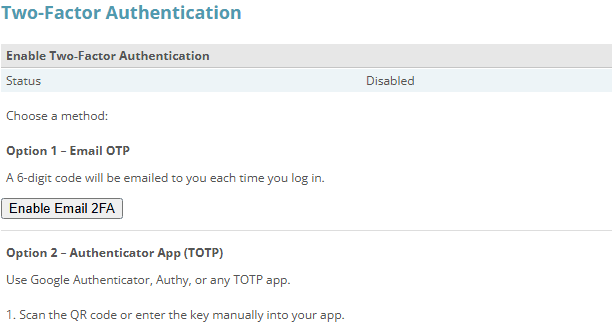
Each administrator chooses a method on the Two-Factor Auth tab of their own account: a code by email, or an authenticator app.
Click for full sized image
Authenticator app
This is the one to use. It is implemented in classes/totp.class.php as standard RFC 6238 time based one time passwords: six digits, a thirty second window, and a base32 encoded shared secret.
Because it is the standard algorithm rather than something bespoke, any normal authenticator works. Google Authenticator, Microsoft Authenticator, Authy, 1Password, Bitwarden, iOS Passwords, whatever your team already uses. Enrolment is by QR code rendered in the browser, so setup is scan and confirm.
The security property that matters: the shared secret never travels after enrolment. The code is derived from the secret and the current time, independently on both sides. There is nothing to intercept in transit on each login, and codes expire in thirty seconds.
Emailed one time code
The alternative sends a code to the administrator’s email address on login. It is easier to roll out to less technical staff, because there is no app to install and nothing to scan.
Be clear about the trade off: this method is only as strong as the mailbox behind it. If someone’s email is compromised, or their email password is the same as their CubeCart password, emailed codes add much less than they appear to. It also depends on your store’s email actually being delivered promptly, which if you have ever chased a missing order confirmation is not something to take for granted.
Use it where an authenticator app genuinely is not workable. Prefer the app everywhere else.
Rolling it out
It is opt in per administrator account, which is the right design for a small business. You do not have to coordinate a flag day. A sensible order:
- Enable it on your own account first, with an authenticator app, and confirm you can log in and out cleanly before touching anyone else’s.
- Check your recovery position. Before rolling it out widely, make sure you know how you would regain access if a phone is lost or replaced. Losing the only enrolled device on the only admin account is a bad afternoon. Keep a second administrator account that you control.
- Enrol your other administrators, app based where you can.
- While you are in there, remove the accounts that should not exist. This is the part most stores skip and it is at least as valuable as the 2FA itself.
That last point deserves expanding. Nearly every store we look at has back office accounts belonging to a developer who finished a job two years ago, an agency that is no longer engaged, or a member of staff who left. Each one is a live credential against your store, and each one is an authenticated vulnerability away from being a serious problem. Two factor authentication on an account nobody should have is not a fix. Deleting it is.
What it does not cover
CubeCart’s 2FA protects the back office. It does not apply to customer accounts on the storefront, and it does not protect the other ways into your site: your hosting control panel, your FTP or SSH access, your database tools, or your domain registrar. An attacker who cannot get into CubeCart admin but can get into your control panel has not been meaningfully slowed down.
If you are doing this properly, do the same exercise across those: enable two factor on your hosting account, remove stale FTP users, and check who has access to your DNS.
Worth knowing about the 6.6.x caveat
2FA arrived in 6.6.0, but do not run 6.6.x to get it. That release line is exposed to the critical remote code execution flaw fixed in 6.7.3 and to everything fixed in 6.7.5 and 6.7.6. Upgrade to the current release, then enable 2FA there. The feature has been present and stable across the whole 6.7 line.
The short version
Upgrade to current. Enable authenticator-app 2FA on every administrator account. Delete the admin accounts that should not exist. Do the same for your hosting login. That sequence removes more real world risk than anything else available to you as a CubeCart store owner, and none of it costs anything.
If you host with us and want a hand working through it, or want us to review who currently has access to your store and your hosting, just ask.
