CubeCart Audit, Request and Error Logs: Knowing What Your Store Did
CubeCart 6.7.0 rebuilt logging across three areas: a new audit log, a new request log, and a revamp of the system and admin error logs. They share one design idea that makes the difference between a log you read and a log you ignore.
The audit log
Every administrator action is now recorded with four things: who did it, from which IP address, against which record, and what changed. That last part is a diff, not just a note that something was edited.
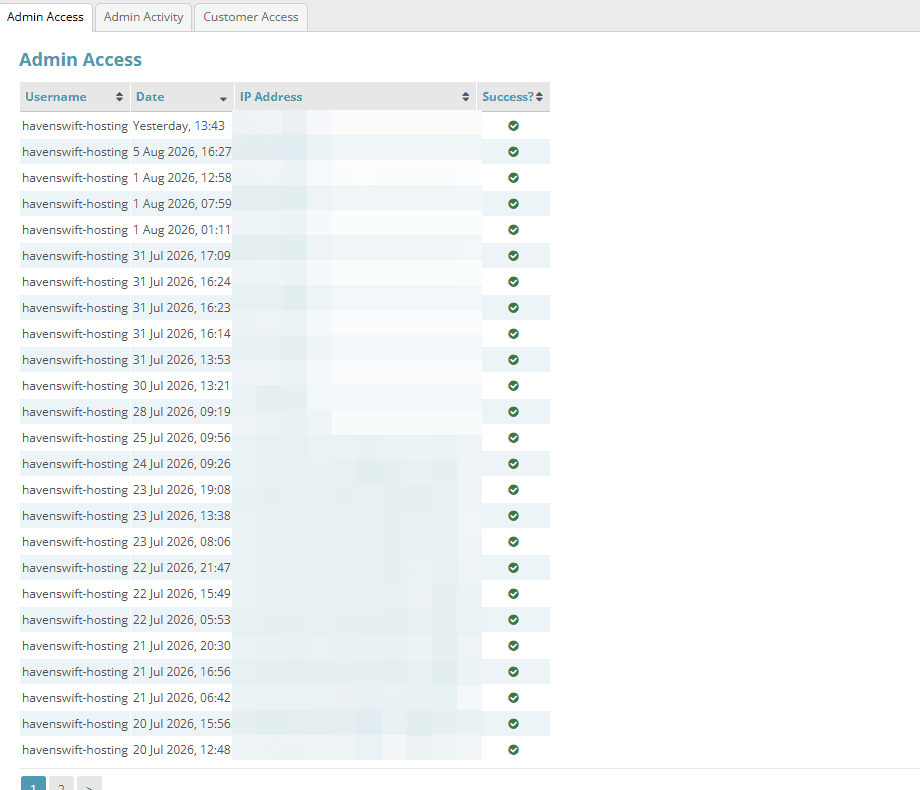
The Admin Access tab records every login attempt. IP addresses are obscured here. Click for full sized image
If you are the only person with back office access, this is mildly interesting. If you have staff, a developer, an agency or a bookkeeper with logins, it is the feature that answers questions you currently cannot answer at all:
- Who changed that product’s price, and what was it before?
- Who cancelled that order?
- Did anyone touch the tax settings before the figures went wrong?
- Was that login from our office or from somewhere else?
That last one is the security use. An audit log is how you establish scope after an incident: what an intruder actually did, rather than what they could theoretically have done. Given how many of the vulnerabilities fixed in 6.7.3, 6.7.5 and 6.7.6 require an authenticated session, having a record of what authenticated sessions did is directly relevant.
It is also useful for the mundane case of a colleague who does not remember making a change. The log is not an accusation, it is just a record, and having one usually shortens the conversation.
The request log
This captures outbound HTTP calls your store makes: to payment gateways, shipping rate APIs, currency feeds, extension update checks, and anything a plugin calls.
You will care about this when something intermittently fails. A shipping quote that works most of the time and occasionally does not, a payment gateway that times out at busy periods, an extension quietly calling home. Without a request log these are almost impossible to diagnose because they leave no trace once the page has rendered.
Worth noting alongside it: from 6.6.0, card numbers are automatically obfuscated in the request log. Logging outbound payment traffic without that would create a genuinely serious data problem. Do check that any custom or third party extension you run is not logging sensitive data elsewhere by its own route.
Hash deduplication, and why it matters
All three logs use the same model: identical entries collapse into a single row carrying an occurrence counter, with first seen and last seen timestamps.
This is the change that makes the logs usable. The normal failure mode of an error log is that one recurring notice fires on every page load, produces a hundred thousand near-identical lines, and buries the one genuinely interesting error underneath. You then stop opening the log, and after that the log serves no purpose at all.
Deduplicated, that same recurring notice is one row with a count of 100,000. It is still visible, it is now obviously the noisy one, and the interesting error sits next to it as one row with a count of 3.
The timestamps add something too. First seen tells you when a problem started, which usually points straight at what caused it: an upgrade, a configuration change, a plugin update. Last seen tells you whether it is still happening or whether you already fixed it.
Practical use
Sort the error log by count descending and fix the top few. On most stores the top three entries account for the overwhelming majority of rows, and they are usually easy: a deprecated call, a missing image, a misconfigured setting.
Then sort by first seen descending. Anything new since your last upgrade is the most likely regression, and the most worth attention.
Check the audit log after any unexplained change. Do not try to read it routinely; it is a lookup tool, not a daily report.
Use the request log when a third party integration misbehaves, and be prepared to hand what you find to whoever supports that integration. “Your endpoint returned a 502 at these seventeen times” is a far more productive support ticket than “it sometimes does not work”.
Related improvements
6.6.0 added quick-clear shortcuts on log pages, and 6.7.0 introduced action tabs that put destructive utilities like Clear Log on the tab row with a danger treatment, so you are less likely to hit them by accident.
6.6.3 added a small but sensible hardening fix: HTML tags are stripped from error messages before they are written to the system error log, closing off a log injection route.
Two log-related bugs were fixed in 6.7.6: duplicate entry errors in the 404 log under concurrent requests, and lock wait timeout errors on the CubeCart_search hit counter. Both are the kind of fault that only appears under real traffic.
Also in 6.7.0, SEO redirects gained hit count and last hit tracking, so you can see which of your redirects are actually being used and retire the ones that are not.
One caveat
Logs grow. A store with meaningful traffic will accumulate audit and request log data steadily, and deduplication helps with repeated entries but not with genuinely distinct ones. Keep an eye on your database size, and use the clear tools periodically rather than discovering the issue through a backup that has quietly doubled.
If you host your CubeCart store with us and want a hand interpreting what your error log is telling you, send it over and we will take a look.
