CubeCart 6.7.0: Sales Reports, Email Overhaul and Audit Logging
CubeCart 6.7.0 was released on 7 May 2026 and is the second of the two big releases in this run. Where 6.6.0 added new capability to the storefront and the platform, 6.7.0 is largely about giving you visibility: what is selling, what your customers searched for, what your administrators did, and what your store is saying to the outside world. It also retires several long standing components.
Read the section on removed features before you upgrade. Two of them will change how you run your store.
What this means for your shop
You finally have proper sales reporting. A whole reports suite arrived: Sales Stats with drill down, Best Selling Products, Search Terms, Users Online, Conversion, Abandoned Carts and Sales by Country. Every report exports to .xlsx, with controls to show and hide columns before you export. Search Terms in particular is worth looking at in your first week, because it tells you what shoppers typed into your search box and did not find.
Your emails send asynchronously and you can see if they were opened. Email sending moved onto the cron queue rather than blocking the customer’s page load, which makes checkout feel faster and stops a slow mail server from holding up an order. Open tracking with per message counters was added, and you can preview any email template from the back office instead of placing test orders to see what it looks like.
Every admin action is now recorded. The new audit log captures who did what, from which IP, against which record, with a diff of what changed. If you have more than one person with back office access, this is the feature that answers “who changed that price” without guesswork.
Removed in this release
Three removals, and you need to plan for two of them.
The in-app database backup tool is gone. If your backup routine was “click the backup button in CubeCart occasionally”, you no longer have a backup routine. Move to server level backups, either through your hosting control panel or through your host. We take care of this for stores we host, but if you are elsewhere, check before you upgrade rather than after.
The store on/offline toggle is gone. Use maintenance mode instead. Functionally similar, but if you have documentation or a process that tells staff to flip the offline switch, it needs updating.
The cookie consent banner is gone, replaced with silent server side logging. If you relied on CubeCart’s built in banner for your cookie compliance, you now need to provide that yourself, whether through your skin or a third party consent tool. This is worth taking seriously if you trade in the UK or EU.
Colorbox was also dropped in favour of native admin modals, which only matters if a custom extension of yours depends on it.
Security
Four vulnerabilities were fixed, all responsibly disclosed, with credit to Th3-SAx11 and Nguy Minh Tuan of the Sun* Cyber Security Research Team.
- GHSA-wpjx-g695-qc5j: server side template injection leading to remote code execution via dangerous PHP functions in Smarty templates.
- GHSA-652f-8c88-25cx: authenticated arbitrary file upload to remote code execution through the REST API’s
POST /api/v1/filesendpoint. Fixed with filename validation, filepath traversal containment, and a defence in depth.htaccessdropped intoimages/source/. This is the reason not to run the 6.6.x REST API on a live store. - GHSA-rm2f-rpcq-6w9f: authenticated SQL injection via
sort[]on the admin orders transactions listing. Fixed with an allowlist of sortable columns and directions plus regex validated identifiers inDatabase::select(). Note that this fix turned out to be incomplete and was finished in 6.7.6. - GHSA-gvcp-wpvp-c6f7: reflected cross site scripting in the storefront search bar.
The detail
Reports
The suite is driven by a new classes/xlsxwriter.class.php for native .xlsx output, with a new statistics tab structure in the admin skin. Reports cover sales with drill down, best sellers, search terms, users online, conversion, abandoned carts and sales by country. Column visibility is configurable per report and carries through to the export.
Email subsystem
Four related issues rebuilt this area: a content and template overhaul, back office template preview, asynchronous sending via cron, and open tracking. Open tracking is served by a new track/open.php endpoint returning a tracking pixel and incrementing a per message counter. Newsletters were moved to asynchronous batched sending through a new processNewsletters cron task with throttling, which is what you want if you have a list of any size and a host with sending limits.
Be aware that async sending had a significant bug on release, fixed in 6.7.2 and described below.
Logging
Three logs, one design. The audit log records admin actions with actor, IP, target and diff. The request log captures outbound HTTP calls made by your store. The system and admin error logs were rebuilt. All three use hash deduplication: identical entries collapse to a single row with an occurrence counter and first and last seen timestamps, rather than a million near identical lines. This is the difference between an error log you can actually read and one you ignore.
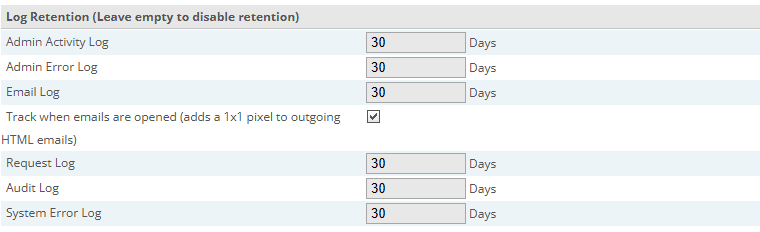
Log retention on the Advanced settings tab, where the audit log and email open tracking sit alongside the existing logs.
Click for full sized image
Hook system
Extensions are now first class owners in the hook registry, and the manage hooks screen shows which extension owns which hook. If you run several plugins that attach to the same points, this is what lets you see the interaction rather than inferring it. Hook lookup was also optimised.
Image picker
Rewritten as a shared modular component (admin/skins/default/js/image-picker.js and element.image_picker.php) used consistently across products, categories, gift certificates, CKEditor and a new digital files mode. Image search was added across the file manager, bulk image pre-fetch on product listings, per option product image assignment from the new options grid, and responsive product images with srcset and sizes.
Other notable changes
Smarty was upgraded to 4.5.6 and CKEditor to 4.22.1. Setup was overhauled with a vanilla JavaScript rewrite and tighter gating on the database required step. SEO redirects were overhauled with hit count and last hit tracking, so you can see which redirects are actually being used. The order builder was refactored onto a shared row list component, fixing penny rounding, stale total and currency precision bugs. Bulk price changes by percentage or fixed amount were added, along with new bulk tools patterns for products, categories and orders. What3Words integration was added for address enrichment. Latest Products became a paged index backed by a new composite index. French and Italian translations were completed.
6.7.1 and 6.7.2
6.7.1 (7 May), released the same day, fixes a single fatal error in Debug::writeSystemErrorLog during setup, triggered when the config singleton was not yet wired up. If you hit an error partway through installing or upgrading to 6.7.0, this is why.
6.7.2 (12 May) is more consequential and contains two things you should know about.
First, a security fix. GHSA-7pvc-gxc4-chmc prevents Host header injection by pinning standard_url and cookie_domain into includes/global.inc.php, where a forged Host: header cannot override them at request time. Config::set() now refuses to write either key, and the upgrade migrates your existing database values into the file automatically. Worth knowing: this pinning broke multi-domain and per-language subdomain stores, which was not fixed until 6.7.6. If you run a store across several domains, do not stop at 6.7.2.
Second, a bug fix for the async email work in 6.7.0. Store emails such as the admin order received notification and the customer confirmation were rendering with empty {$DATA.*} fields. The cause is worth understanding: template parsing had been deferred to shutdown, by which time page rendering had reassigned the global Smarty DATA variable, so the order context was gone. Parsing now happens at queue time while that context is still authoritative. If you upgraded to 6.7.0 or 6.7.1 and your order emails came out blank, that was this.
6.7.2 also fixed an over-encoded basket redirect from SEO::rewriteSingleUrl(), corrected SSL::validRedirect() host comparison for stores installed under a subpath, made the image picker auto-select newly uploaded files on the product page, and limited the Google Base feed to the main product image rather than a comma joined list.
Should you upgrade?
Not to 6.7.0, 6.7.1 or 6.7.2 specifically. 6.7.3 fixed a critical remote code execution vulnerability that all of these are exposed to, and 6.7.5 and 6.7.6 fixed several more. Upgrade to the current release.
The reason to read this article is that 6.7.0 is where the reporting, logging and email visibility in your current store came from, and where three features you may still be relying on were removed. Check your backup arrangements and your cookie consent before you go anywhere near it.
If you host your CubeCart store with us and want the upgrade run on a staging copy first, or want us to confirm your backups are covered now the in-app tool has gone, get in touch.
