Managing CubeCart Extensions: Marketplace, Visibility and Maintenance
Extension management in CubeCart was reworked across four releases: a redeveloped marketplace in 6.6.0, visibility and toggle controls in 6.6.3, ownership in the hook registry in 6.7.0, and auto-update surfacing in 6.7.4. Individually minor, collectively they change how much you can see about what is running on your store.
The Extension Marketplace (6.6.0)
Completely redeveloped for browsing and installing extensions. The practical effect is that finding and installing an extension is a supported flow rather than a hunt.
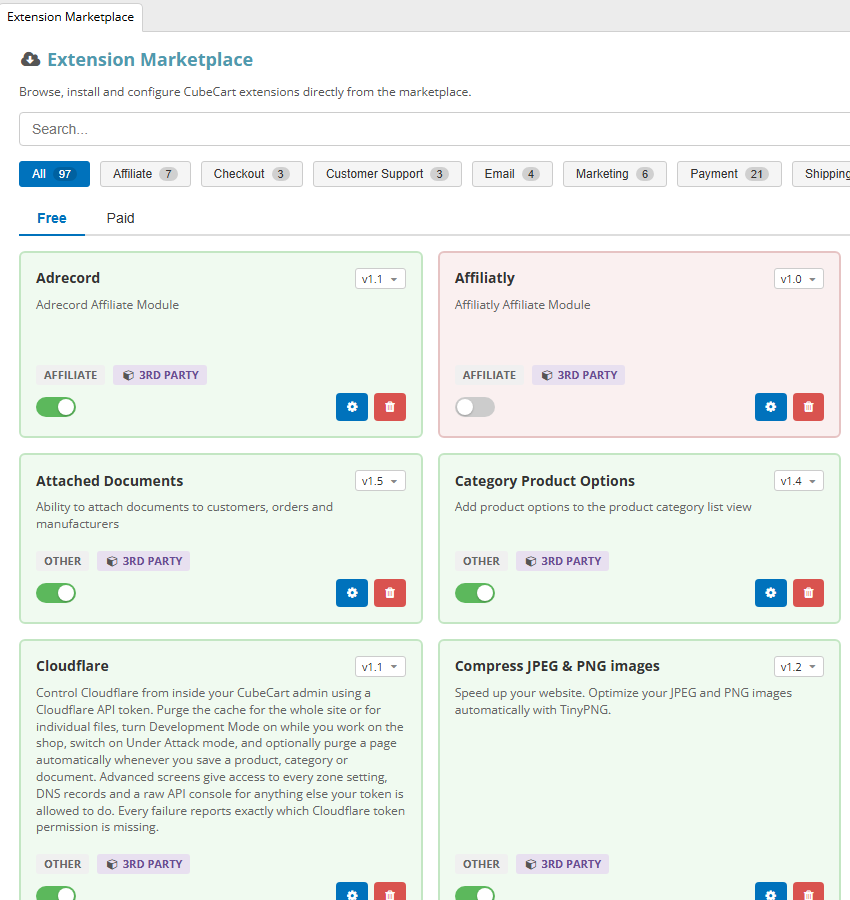
The marketplace, filtered by category, with an enable toggle and version selector on each extension. Click for full sized image
Two related fixes followed quickly, which tells you the first version had rough edges: 6.6.1 made the extension upgrade button active only when the version has actually changed, and 6.6.2 stopped the install redirect forcing a page change.
Seeing what is actually installed (6.6.3)
Three changes that together fix a genuine blind spot:
- A new Extensions tab on the dashboard, with per-administrator seen state, so a notification you have dismissed does not keep reappearing for you but is still shown to a colleague who has not seen it.
- Installed extensions show their enabled or disabled state in the listing.
- Extensions can be toggled on or off from the listing rather than opening each one.
That middle one sounds trivial and is not. Being able to see at a glance which extensions are installed but disabled is how you find the plugin somebody turned off two years ago to test something and never removed. Disabled extensions are still files on your server, still potentially unpatched, and still a maintenance liability.
Hook ownership (6.7.0)
Covered in more detail in our article on the hook system, but the relevant part here: extensions became first class owners in the hook registry, and the manage hooks screen shows which extension owns which hook.
This is the tool for diagnosing extension conflicts. Two plugins attaching to the same checkout behaviour is a classic cause of intermittent faults, and previously you had to infer that from symptoms. Now you can look.
Auto-updates on the dashboard (6.7.4)
Plugin and extension auto-updates are surfaced on both the dashboard and the extensions page, so an available update is visible where you already look rather than only if you go hunting for it.
6.7.6 fixed a related annoyance: the “recent extensions” notification not clearing for stores west of UTC. A timezone bug, and one that made the notification useless for anyone in the Americas.
6.7.6 also made plugins that provide a gateway.class.php show their allowed and disabled zones, which is useful if you run several payment gateways with different geographic availability.
Extensions can now do more
Three changes across these releases gave extensions capabilities they previously lacked, which matters if you use them or write them:
Trusted Smarty include paths (6.6.1). Extensions can register their own. Without this the 6.6.0 template security policy broke third party extensions outright.
Hook registry ownership (6.7.0). Extensions declare their hooks properly rather than registering anonymously.
Scheduled task registration (6.7.6). Through a new class.cron.tasks hook, an extension registers its own task, appearing in Scheduled Tasks with its own toggle, frequency, last run and last result, instead of sharing the single code snippets task. For anyone running several extensions with background work, this is the difference between seeing what ran and guessing.
A short maintenance routine
Now that the information is available, it is worth acting on it. Twice a year is enough:
- List your installed extensions and confirm you know what each one does and why it is there.
- Remove the disabled ones you are not going to re-enable. Not just disabled: removed.
- Check for updates, now visible on the dashboard, and apply them. An unmaintained extension is one of the more likely routes into a store.
- Check the hook screen for extensions attaching to the same points, particularly around checkout and pricing.
- Check Scheduled Tasks for extension-registered tasks, and whether they are running and succeeding.
- Ask whether anything unmaintained can be replaced by core. Several things that needed a plugin before 6.6.0 no longer do, including customer group restrictions on categories and products, bulk price changes, and scheduled tasks.
That last point is worth taking seriously. Every extension you can retire because core now covers it is one less thing to update, one less potential conflict, and one less unmaintained codebase running on your store.
A word on encoded and licensed extensions
Encoded files used to be tied to a specific PHP version by their encoder, so a PHP upgrade could break a commercial extension in ways that looked like a CubeCart fault. That is no longer the case with ours: every encoded extension we supply runs on all PHP versions from 7.4 up to and including 8.5, so moving your store to a newer PHP needs no rebuild and no new download. If you run encoded extensions from another vendor, it is worth confirming the same before you upgrade.
If you host your CubeCart store with us and want a hand auditing what is installed, or working out which extensions you no longer need, get in touch.
