CubeCart Hooks: The Editor, Extension Ownership and Template Security
CubeCart’s hook system, the mechanism that lets extensions change behaviour without editing core files, was reworked across 6.6.0, 6.6.1, 6.7.0 and 6.7.6. If you run plugins or a custom skin, or you write them, this is the plumbing underneath everything you rely on.
What hooks are, briefly
A hook is a defined point in CubeCart’s code where extensions can attach their own logic. It is the reason you can add a feature to your store without modifying core files, and therefore the reason you can still upgrade afterwards.
This principle matters enough to state plainly: never modify CubeCart core files. Every upgrade overwrites them, and every customisation you made that way disappears, usually at the least convenient moment. Hooks exist so you do not have to.
The hook editor with version control (6.6.0)
6.6.0 added an editor for custom hook code, with built in version control.
The version control part is the useful bit. Custom hook code is exactly where a small change breaks something subtly and nobody remembers what it looked like before. Having previous versions retained means a bad edit is recoverable rather than a reconstruction exercise.
A word of caution about it, though. Editing code through a web form is convenient and it is not a substitute for keeping that code somewhere you control. If a hook snippet is doing anything important to your business, it should exist in your own files or a repository too, not only in your store’s database.
Extensions as first class hook owners (6.7.0)
The most substantial change. Extensions are now first class citizens in the hook registry, and the manage hooks screen shows which extension owns which hook.
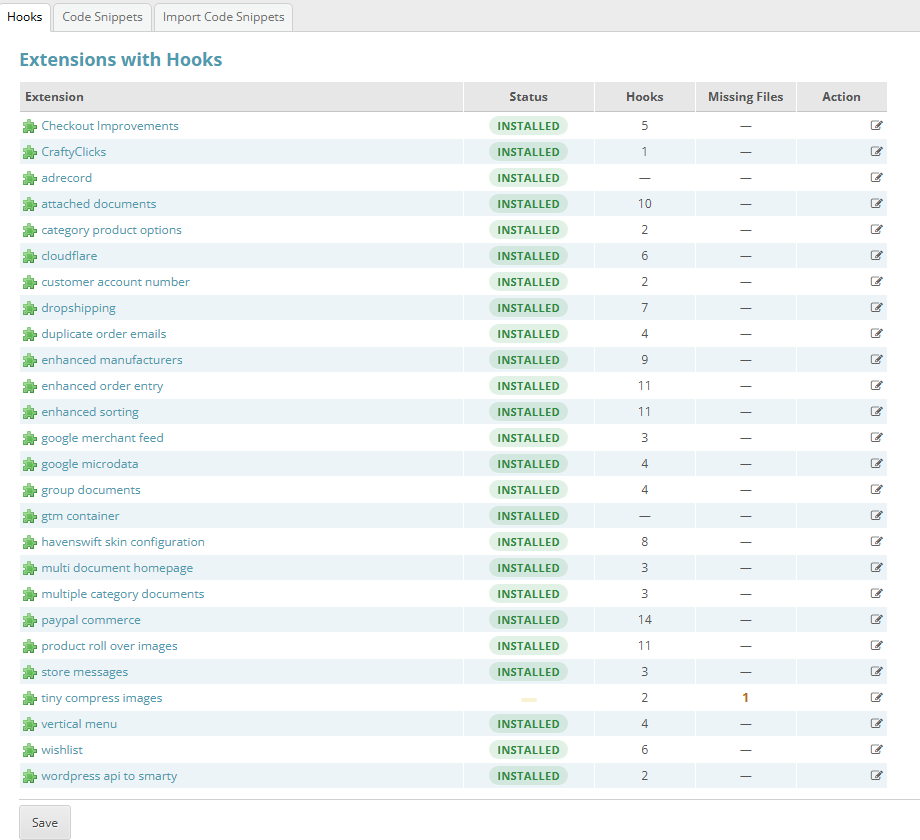
Settings > Hooks lists every extension with hooks, how many it registers, and whether any of its files are missing. Click for full sized image
If you have ever run several plugins that attach to the same point, you will recognise the problem this solves. Previously the hook list was a flat set of registrations, and working out which plugin was responsible for which behaviour, or which two were fighting, was guesswork. Now ownership is visible.
This matters most when diagnosing conflicts. Two extensions modifying the same checkout behaviour is a classic source of intermittent faults, and the first step in fixing it is knowing they are both there. Hook lookup was also optimised in the same release.
Smarty template security: the awkward middle (6.6.0 to 6.7.6)
Running alongside the hook work is a security story worth following, because it affected real stores.
Templates in CubeCart can contain logic, which means a template is code, which means an administrator who can edit templates can potentially run code. That is the vulnerability class behind several fixes in this run.
6.6.0 introduced a Smarty security policy using an allow list. Safe in principle, and it broke legitimate template code in the field.
6.6.1 flipped it to a block list of genuinely dangerous functions, restored the ucfirst modifier that had been caught by the previous approach, whitelisted module template paths, added a trusted path for local JavaScript includes, and crucially gave extensions a way to register their own trusted Smarty include paths. That last one is what made third party extensions workable again.
If you run custom skins or third party extensions, this is why 6.6.0 on its own could break them and 6.6.1 fixed it.
6.7.0 fixed GHSA-wpjx-g695-qc5j, server side template injection leading to remote code execution through dangerous PHP functions in templates.
6.7.6 fixed GHSA-5mr8-hgcv-3pcj, closing three bypasses of that policy, and they are instructive:
- An empty allowlist for static class access was treated as “allow all”, so a template could call any
{Class::method()}. Find a callback-invoking static method on a loaded class and the function denylist was irrelevant. - Callback-taking functions were missing from the denylist, including
array_walk_recursive. - Both checks compared function names case-sensitively, so changing capitalisation walked straight past them.
That third one is the sort of bug that leaves a security control looking present while doing nothing at all. 6.7.6 also added a $glob['smarty_allowed_php'] setting so an install can un-ban a specific function where an extension genuinely needs one, with shell and eval functions exempt from the override.
Plugins can register scheduled tasks (6.7.6)
A related improvement through a new class.cron.tasks hook. Previously a plugin needing scheduled work had to share the single code snippets task, with no independent frequency, no separate toggle, and no way to tell whose work failed. Now each registered task appears in Scheduled Tasks with its own enable toggle, frequency, last run and last result.
What this means for you
If you run extensions: use the manage hooks screen to see what is attached where. When something behaves oddly after installing a plugin, that screen is the first place to look, not the last.
If you have custom template code: the Smarty security policy has changed repeatedly across these releases. Test your skin on a staging copy after upgrading rather than in production. Something that worked on 6.5.12 may not on 6.6.0, may work again on 6.6.1, and may hit the tightened policy on 6.7.6.
If you write extensions: register your trusted include paths properly (6.6.1 onwards), declare your hooks so ownership shows in the admin, and use class.cron.tasks for scheduled work rather than the shared snippets task.
If you were tempted to edit a core file: do not. Use a hook. Ask us if you are not sure how.
If you host your CubeCart store with us and want a hand tracking down an extension conflict or getting custom template code working against the current Smarty policy, get in touch.
