Converting MyISAM Tables to InnoDB: Why and How
MySQL stopped using MyISAM as its default storage engine in 2010, when InnoDB took over in MySQL 5.5.5. Sixteen years later there are still a great many MyISAM tables in production, because nothing forces an existing table to change engine and nobody notices until the site gets busy.
Sites carry it forward in two ways. Either the database was created long enough ago that MyISAM was the default at the time, or the site was migrated from an old host using a backup or migration tool that faithfully restored the original engine along with the data. Both are common, and neither produces any warning.
If your site is one of them, converting is usually a short job with a real payoff.
The difference that matters: locking
Everything else is secondary to this one.
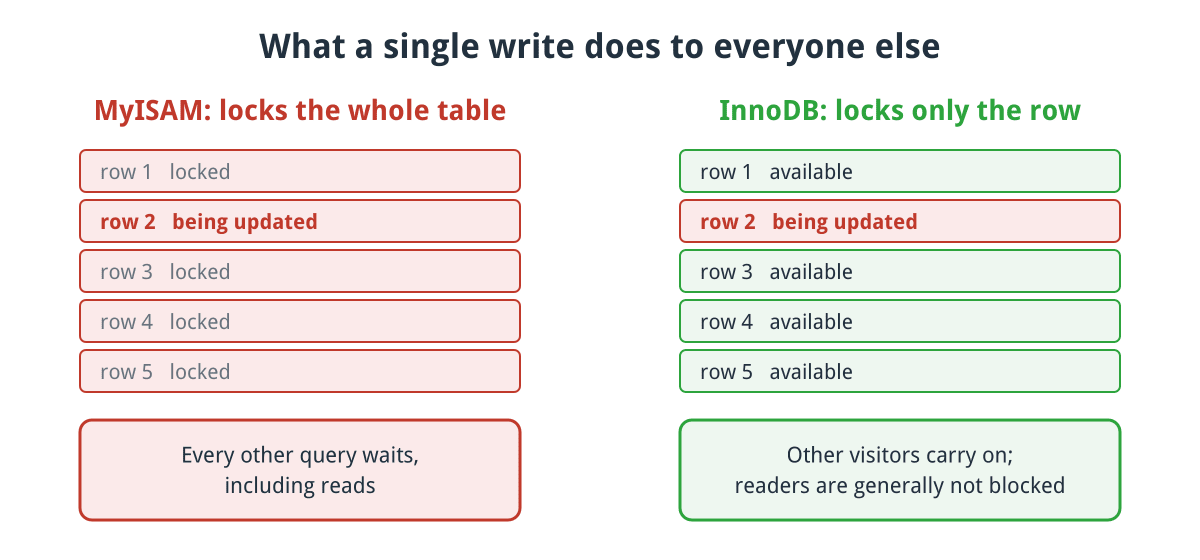
One write, two very different effects on everyone else using the table.
Click for full sized image
MyISAM locks the entire table on every write. While one visitor’s update runs, every other query touching that table waits, including reads. On a quiet site nobody notices. On a busy one, or during something like a bulk stock import, queries queue behind each other and the site appears to hang for everyone.
InnoDB locks individual rows. Two visitors updating different records do not block one another, and readers are generally not blocked by writers at all.
This is why the difference shows up exactly when you least want a problem, which is when you are busy. It is also why the symptom is so often misdiagnosed: the site is fine when you test it, and slow when it matters.
The other differences
Crash recovery. InnoDB keeps a redo log and repairs itself automatically after an unclean shutdown. MyISAM does not, and corrupt tables after a power loss or a crash are a normal occurrence rather than an unlucky one. Anyone who has run REPAIR TABLE at an inconvenient hour knows this already.
Transactions. InnoDB supports proper transactions, so a group of statements either all succeed or all roll back. MyISAM has none, so an operation that fails halfway through leaves the database in whatever state it reached. For an order being written across several tables, that is the difference between a clean failure and a half-created order.
Foreign keys. InnoDB can enforce referential integrity at the database level. MyISAM silently ignores foreign key definitions, which means constraints you think you have declared are doing nothing at all.
Caching. InnoDB’s buffer pool caches both data and indexes in memory. MyISAM’s key cache holds only indexes and leaves the data to the operating system’s file cache, which it has no control over.
The genuine trade-offs
Two things do get worse, and it is worth knowing about them so they do not surprise you.
Unqualified row counts are slower. MyISAM stores an exact row count, so SELECT COUNT(*) FROM table is instant. InnoDB has to count, because with transactions the answer depends on who is asking. If some report does this repeatedly on a large table you may notice. Adding a WHERE clause makes both engines do real work anyway, so this only affects the unqualified case.
Tables take more disk space. Expect InnoDB tables to be somewhat larger than the MyISAM equivalents.
Neither is a reason to stay on MyISAM for a website. They are reasons not to be alarmed when you see them.
One prerequisite to check
If your tables use FULLTEXT indexes, you need MySQL 5.6 or later, which is when InnoDB gained FULLTEXT support. Any currently supported MySQL or MariaDB is well past that, but if you are on something genuinely ancient, check before converting rather than after.
Finding out what you have
Run this against your database, substituting your database name:
SELECT TABLE_NAME, ENGINE, TABLE_ROWS
FROM information_schema.TABLES
WHERE TABLE_SCHEMA = 'your_database_name'
ORDER BY ENGINE, TABLE_NAME;
You can run it in phpMyAdmin from your control panel if you do not have command line access. Anything reporting MyISAM is a candidate.
Expect a mixture rather than a clean answer. It is entirely normal to find a site where the original tables are MyISAM and everything a plugin has added since is InnoDB, because each was created under whatever default applied at the time.
Converting
Take a backup first. Not a recent one, a fresh one, taken immediately before you start. This is a rewrite of every affected table.
Then, per table:
ALTER TABLE `table_name` ENGINE=InnoDB;A few practical points:
It rebuilds the table. You need free disk space roughly equal to the size of the largest table you are converting, and the table is unavailable while it runs. On a small site this is seconds. On a table with millions of rows it can take a while, so do it when the site is quiet.
Leave the mysql system database alone. Its tables are deliberately MyISAM. Convert your application’s database only.
Do the tables one at a time rather than scripting the lot in one go, so that if one fails you know which and can stop.
Set the default afterwards so new tables get InnoDB automatically. On any modern MySQL or MariaDB this is already the case, but it is worth confirming with SHOW VARIABLES LIKE 'default_storage_engine';
Then verify by re-running the information_schema query, and exercise the site properly: submit a form, place a test order, run a search, load an admin report.
WordPress and WooCommerce
WordPress does not specify a storage engine when it creates its tables, and neither does WooCommerce. Both simply take whatever the server default is at the moment of installation. On a modern install that means InnoDB throughout, but a site that has been carried forward from an older host can still be running its core tables on MyISAM years later.
Two tables make this worth checking on any WordPress site of reasonable size:
wp_options is read on virtually every request, and written to constantly by transients and plugin state. Under MyISAM, each of those writes locks the whole table and everything else waits.
wp_postmeta is usually the largest table on the site and grows without much attention being paid to it.
For WooCommerce the case is stronger still, because a shop writes far more than a blog does. woocommerce_sessions is written for essentially every shopper with a basket, and order, stock and product lookup tables are updated throughout the buying process. That is a steady stream of writes on tables that customers are simultaneously reading, which is precisely the workload table level locking handles worst.
Be aware that plugins vary. Most create tables without specifying an engine, so they inherit the default, but backup and migration tools in particular can restore tables with their original engine intact. That is how a site can arrive at a new host on modern MySQL and still be running half its tables on MyISAM. Check the whole database rather than assuming the core tables represent the rest.
CubeCart
CubeCart is a good example of a platform that has settled the question. Its current schema specifies InnoDB explicitly for all eighty of its tables, so there is no MyISAM anywhere in a current install.
Better still, it has a built-in conversion route. Under Maintenance in the back office, selecting tables and choosing Rebuild issues ALTER TABLE ... ENGINE=InnoDB for each one, so a store that dates back far enough to have inherited MyISAM tables can be converted without touching a command line. Take a backup first regardless.
It also uses FULLTEXT indexes on several tables including products, customers and reviews, which is the case where the MySQL 5.6 prerequisite above genuinely matters.
A note on memory
InnoDB’s performance depends heavily on innodb_buffer_pool_size, which controls how much data it can hold in memory. If it is too small, InnoDB goes to disk constantly and can feel slower than the MyISAM setup you just replaced. That is the usual reason someone concludes the conversion made things worse.
On a dedicated database server this is normally set to a large proportion of available RAM. On shared hosting you cannot change it, and it is your host’s job to have set it sensibly. If you convert and performance is disappointing, that is the thing to ask about rather than reverting.
Worth doing?
For any site taking orders or handling a meaningful number of writes, yes. Table level locking is a real constraint that shows up precisely when traffic is highest, and crash recovery alone justifies the half hour. It is also one of the higher value items in a wider website speed exercise, because it fixes the server side of the problem rather than the appearance of the page.
Check what engine your tables use. If the answer is MyISAM, you are running on a default that MySQL moved away from before a lot of current websites existed.
If you host with us, we are happy to check your databases and handle the conversion for you, backups and all. Just ask.
