A Beginner’s Guide to Website Speed Optimisation
Site speed is one of those subjects where the advice is plentiful and mostly unhelpful. You are told to install a caching plugin, minify everything, and chase a green score in a testing tool. Some of that helps. Some of it makes no measurable difference, and a little of it will break your site.
This is the order we work in when someone asks us to make their site faster, and the reasoning behind it.
Measure before you change anything
You cannot tell whether a change helped if you did not record what things were like beforehand. Take a baseline, and take it more than once, because a single measurement on a shared connection tells you very little.
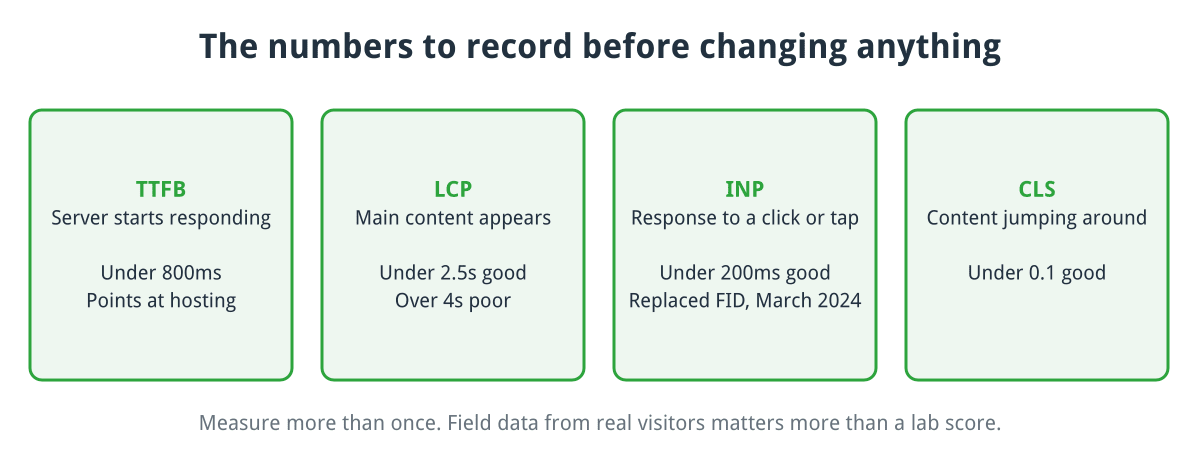
The four numbers worth recording before you change anything, with the usual good targets.
Click for full sized image
The metrics worth knowing are Google’s Core Web Vitals:
- LCP (Largest Contentful Paint) is how long until the main content appears. Under 2.5 seconds is good, over 4 is poor.
- INP (Interaction to Next Paint) is how quickly the page responds when someone clicks or taps. Under 200ms is good. It replaced First Input Delay in March 2024, so older guides referring to FID are out of date.
- CLS (Cumulative Layout Shift) measures content jumping around as the page loads. Under 0.1 is good.
Alongside those, watch TTFB (Time To First Byte), which is how long the server takes to start responding. Under 800ms is the usual target. TTFB is the one that points at hosting and application problems rather than front end ones, and it is the number most often ignored.
Use PageSpeed Insights for the lab and field data together, and Search Console’s Core Web Vitals report for what real visitors experienced. The field data matters more than the lab score, because it is measured from actual devices on actual connections rather than a simulated one.
Fix the server first
Front end optimisation cannot rescue a slow backend. If your TTFB is two seconds, no amount of image compression will save you, because nothing can start until the server responds.
Check your PHP version. This is the single easiest win available and a surprising number of sites are still on something ancient. Each major PHP release since 7.0 has brought real performance gains, and an out of date version is also a security problem. Move to a currently supported release and test.
Make sure OPcache is on. It caches compiled PHP so the interpreter is not reparsing your entire codebase on every request. It should be enabled by default; it is worth confirming rather than assuming.
Look at the database. Slow queries and missing indexes are a common cause of high TTFB on shops with a large catalogue. Keeping your platform current helps more than people expect here: CubeCart 6.6.0, for instance, added missing indexes and optimised an expensive inventory query. If your tables are still MyISAM, converting to InnoDB is usually worthwhile on its own, because MyISAM locks the whole table on every write and that serialises everything else.
Add an object cache. Redis or memcached will hold the results of repeated database lookups in memory. On a busy shop this makes a bigger difference than most front end work.
Then cache the page itself
Page caching stores the finished HTML so repeat requests skip PHP and the database entirely. For content pages this is transformative.
The complication for shops is that pages containing a basket, a logged-in customer’s name or personalised pricing must not be served from a shared cache. Any decent caching layer knows to exclude the basket, checkout and account pages, but it is worth testing rather than trusting: log in, add something to the basket, and confirm you are not being shown another visitor’s session.
A CDN takes this a step further by caching at locations near your visitors. It cuts the round trip time, which is why it helps disproportionately for people a long way from your server. It also gives you free improvements you would otherwise have to configure yourself, such as modern compression and HTTP/2 or HTTP/3.
Images are where most pages are won or lost
On a typical shop, images are the majority of the page weight. Three things to do:
Serve modern formats. WebP is meaningfully smaller than JPEG or PNG at comparable quality and is supported everywhere that matters now. AVIF is smaller still.
Serve them at the size they are displayed. A 3,000 pixel wide photograph displayed in a 400 pixel box wastes almost everything it downloads. This is extremely common on shops where product photos are uploaded straight from a camera.
Lazy load below the fold, but not above it. Adding loading="lazy" to images further down the page defers them until needed. Do not do it to your hero image or main product photo, because that is usually your LCP element and lazy loading it makes your headline metric worse. This is a genuinely common own goal.
While you are there, set explicit width and height attributes on images. That is what stops the page reflowing as they load, which is most of CLS solved.
Scripts, and knowing when to stop
Third party JavaScript is usually the largest remaining cost, and often the least examined. Chat widgets, analytics, heatmaps, review widgets, A/B testing tools and advertising tags accumulate over years and rarely get removed.
Open your browser’s network tab and look at what your pages actually load. Anything you cannot justify should go. This is a security improvement as well as a speed one, since every third party script is code you do not control running on your site.
For what remains, defer or async on script tags stops them blocking rendering. Minification and combining files still help, though less than they did before HTTP/2 made parallel requests cheap.
A warning on asset optimisation plugins. The aggressive settings that combine and reorder scripts will break some sites, and the breakage is often subtle: a slider that stops working, a checkout button that does nothing on one browser. Enable these one at a time and test the checkout after each. A fast site that cannot take payment is not an improvement.
Fonts, briefly
Custom fonts commonly cost more than people expect. Host them yourself rather than fetching from a third party, subset them to the characters you actually use, and set font-display: swap so text is readable while the font loads instead of invisible.
What not to bother with
Do not chase 100 out of 100. The score is a weighted approximation, and the last fifteen points usually cost more effort than the entire rest of the exercise while making no difference a visitor could perceive.
Do not stack caching plugins. Two caching layers that do not know about each other produce stale pages and confusing bugs. Pick one.
Do not optimise what nobody visits. Fix your homepage, your main category pages, your top product pages and your checkout. That is where the money is.
Where to start
Run PageSpeed Insights on your homepage and one product page and write down the numbers. If TTFB is high, the problem is your server or your application and there is no point touching images yet. If it is high and varies for no obvious reason, check the load is genuine first, because a site being used in a DDoS attack against someone else looks exactly like this. A smaller version of the same problem is another site displaying your images from your server, which shows up in your traffic statistics as image requests carrying someone else’s referer. If TTFB is fine but LCP is poor, start with the largest image on the page.
Change one thing at a time and measure again. It is slower than following a checklist, but it is the only way to know which changes were worth making.
If you host with us and want a look at where your time is actually going, ask and we will run through it with you.
