CubeCart PayPal Commerce Platform: Full Setup, and the Phone Number Issue Revisited
The PayPal Commerce Platform plugin is now the way CubeCart integrates with PayPal, and it is a considerably bigger piece of software than the PayPal Standard module it replaced. It puts PayPal, card fields, Pay Later, Venmo, Apple Pay and Google Pay directly on your checkout rather than sending customers away to paypal.com.
We wrote critically about this plugin in 2021 over the way it handled customer phone numbers. That specific problem has since been fixed. This article covers what the current version actually does, how to set it up, and what the remaining behaviour around customer data means for you.
What you get
Buttons on the page, not a redirect. The smart button block renders in your basket and checkout. The customer approves the payment in a PayPal popup and returns to your store to finish. Fewer abandonments than a full redirect, and your branding stays on screen.
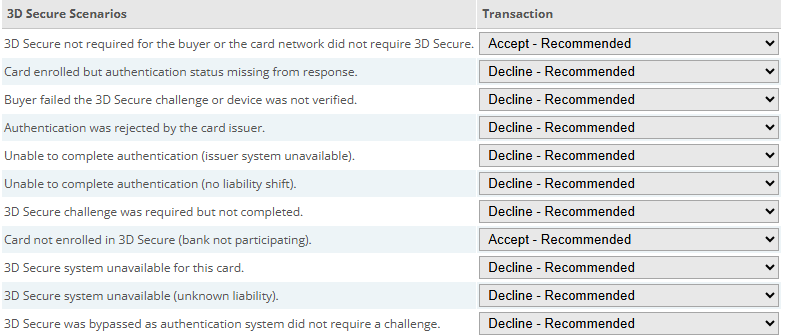
Eleven 3D Secure outcomes, each with its own accept-or-decline rule. The defaults are sensible; changing them shifts chargeback liability.
Click for full sized image
Inline card fields. Customers who do not have a PayPal account can pay by card without leaving your checkout. The fields are hosted by PayPal, which matters for PCI scope: the card number never touches your server. You can turn these off if you take cards through another gateway.
Pay Later. Buy-now-pay-later, presented as a separate button and, optionally, as promotional messaging on other pages. The plugin lets you place that messaging independently on the home page, category pages, product pages, the basket and the payment step, with control over layout, logo, text alignment, colour and position.
Wallets. Venmo, Apple Pay and Google Pay each have their own toggle. Apple Pay requires domain verification with Apple before it will appear.
Product page buttons. A display option puts a PayPal button on the product detail page for customers who want to buy one item without going through the basket.
Authorise or capture. The settlement setting chooses whether funds are taken immediately or authorised and captured later. Authorise suits made-to-order or stock-checked goods. The plugin also voids the authorisation automatically when an order is cancelled, through a hook on order status changes.
Country and locale control. You can restrict which countries PayPal is offered in, and set the locale used for the buttons.
Setting it up
- Onboard for PayPal Commerce Platform. This is not the same as an ordinary PayPal business account, and it is the step people miss. You need Commerce Platform access on your PayPal account before the credentials will work.
- Create REST API credentials in the PayPal developer dashboard and paste the Client ID and Secret into the plugin. There are separate fields for sandbox and live, so you can configure both and switch between them with the sandbox toggle rather than retyping.
- Set up a webhook in PayPal pointing at your store, and put the Webhook ID into the plugin. This is how PayPal tells your store about payment events that happen outside the customer’s browser session. There is a setting to skip webhook signature verification; leave it off on a live store, it exists for diagnosing problems.
- Choose your settlement mode, authorise or capture.
- Enable the funding sources you want: Pay Later, Venmo, Apple Pay, Google Pay, and whether inline card fields are shown.
- Style the buttons: colour, shape, height, label, layout and tagline.
- Test in sandbox. There is a buyer country setting specifically for sandbox testing, which lets you see what a customer in another country would be offered.
Test the full path before going live: a card payment, a PayPal account payment, a cancelled payment, and a refund from the back office.
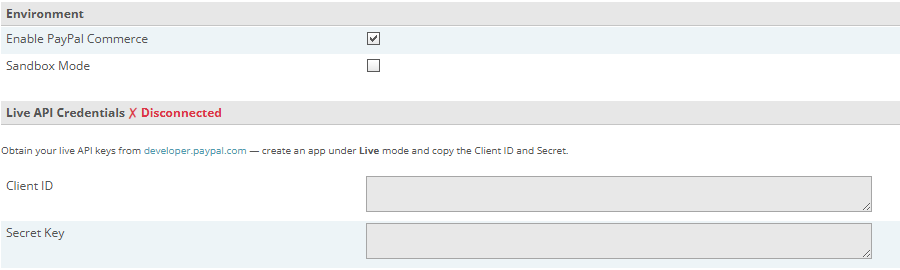
Environment and credentials. Connect the sandbox and test there before you put live keys in.
Click for full sized image
The customer data question, revisited
Our 2021 complaint was that the plugin overwrote the phone number held in CubeCart with whatever PayPal had, and because PayPal defaults to not collecting a phone number, existing customers ended up with a phone number of “Disabled in PayPal” against their order and account.
That specific bug is fixed. Before the customer record is updated, the plugin now checks for that placeholder and removes it rather than writing it, so a customer who already has a phone number in your store no longer loses it to a meaningless string.
What has not changed is the underlying design, and it is worth being clear about it:
The address is still replaced. On returning from PayPal, the plugin deletes the customer’s default billing address and saves the address PayPal supplied. If your customer deliberately keeps a different address in your store from the one on their PayPal account, PayPal’s wins.
The phone number is still replaced when PayPal has one. The fix stops the placeholder being written; it does not stop a real PayPal phone number overwriting the one your customer gave you.
The name is taken from PayPal too, and the title field is blanked.
The email address is deliberately left alone, because it is the account key.
One thing worth testing if you sell digital goods: the phone value is only populated when PayPal returns a shipping address. Where no shipping address comes back, which is the normal case for a digital-only order, the phone field is written as empty rather than being left untouched. If you sell downloads to logged-in customers, place a test order and check the account afterwards.
Should you still force the phone number in PayPal?
Our original advice was to set your PayPal account’s contact telephone option to “On (Required Field)”, found under Account Settings, Website payments, Website preferences. PayPal defaults this to off and encourages you to leave it that way.
With the placeholder bug fixed, this is no longer necessary to avoid corrupting your records. It is still worth considering if you genuinely need a phone number on every order, for couriers who require one on the label. Be aware it is a real friction point at checkout, so it is a trade rather than an obvious win. If you do not need the number, leave PayPal’s default alone.
Is it worth switching to?
If you are still on PayPal Standard, yes. It is unsupported, and the checkout experience is materially worse: a full redirect off your site at the moment of payment, and no card option for customers without a PayPal account.
The Commerce Platform plugin is more to configure and depends on onboarding correctly, but the result is a checkout that keeps the customer on your store and offers cards, wallets and Pay Later without a second gateway.
The customer data behaviour remains the thing to go in with your eyes open about. For most shops it is a non-issue, because the address PayPal holds is the address the customer wants their goods sent to. For shops with trade customers who have deliberately different billing arrangements, test it properly first.
If you use our fully managed CubeCart hosting and want a hand with the Commerce Platform onboarding or the webhook setup, get in touch.
