CubeCart Tax and Rounding: What Changed and What to Check
Tax and price rounding was reworked across 6.6.0, corrected again in 6.6.3, and finished in 6.7.6. If you sell with tax inclusive pricing, ship to more than one tax rate, or run coupons, your figures have changed. This article explains what and why.
Why rounding is genuinely hard here
It looks like arithmetic and it is not. The difficulty is that a shop has to produce a set of numbers that are individually correct, correctly displayed to two decimal places, and add up. Those three requirements conflict.
Take an item at 9.99 inclusive of 20 percent VAT. The net is 8.325, the tax is 1.665. Neither is a real money amount. Buy three and the true tax is 4.995. Round each line and you get 1.67 three times, or 5.01. Round the total and you get 5.00. Both are defensible, they differ by a penny, and if your subtotal, tax line and grand total each round independently you can produce an invoice that does not add up.
Now add a coupon across a basket with mixed tax rates and you have to decide how the discount is apportioned before any of that happens. This is where most e-commerce tax bugs live.
What 6.6.0 changed
Six related issues:
- Tax rounding bugs eliminated for penny-accurate calculations.
- Coupon plus tax rewritten completely for baskets with mixed tax rates. This was a rewrite rather than a patch, which tells you how bad the previous logic was.
- Gift certificates now deduct from the order total, not the subtotal. This is the one most likely to change your numbers. Deducting from the subtotal means tax is calculated on an amount the customer never paid. Deducting from the total is what customers expect and what most people assumed was happening.
- The redundant tax setting was removed from gift cards.
- Zero-rated tax lines are hidden at checkout, rather than showing a 0.00 line that only prompts questions.
- The total discount line only appears when more than one discount applies.
The corrections that followed
6.6.3 fixed a gift certificate failing to clear the balance on tax inclusive stores, due to an inclusive-tax rounding error. The symptom was an order left with a penny or two outstanding and stuck. If you sell gift certificates on an inclusive-price store, this was costing you completed orders.
6.7.0 refactored the order builder onto a shared row list component, which fixed penny rounding, stale total and currency precision bugs in the admin order editor. If you build or amend orders by hand in the back office, this is where those totals stopped drifting.
6.7.6 finished the job with three fixes:
- Remaining tax-inclusive rounding issues fixed, and inclusive totals now shown on order receipts. Showing the inclusive total is not cosmetic; it is what a customer needs to reconcile what they were charged.
- A fix for inclusive-price subtotals where the customer’s VAT rate differs from the store’s. This matters for cross-border sales, and it is exactly the case where an inclusive-price shop is hardest to get right: the displayed price is fixed but the tax inside it is not.
getProductPrice()was applying percentage group and category discounts twice on category listings. Customers in a discount group saw a price on the category page lower than the one in the basket. That is the worst possible direction for a pricing error to go, because it looks like a bait and switch.
Also in 6.7.6: the tax or tariff line no longer goes missing from totals when a zero-value inherited tax is present, a tariff code charging both physical and digital products was fixed, and customer group pricing at product level now accepts 0.00 and empty values, which it previously rejected.
What you must do after upgrading
This is the section that matters. These changes are corrections, which means some of your figures will legitimately differ from before. You need to know which, rather than finding out from a customer or an accountant.
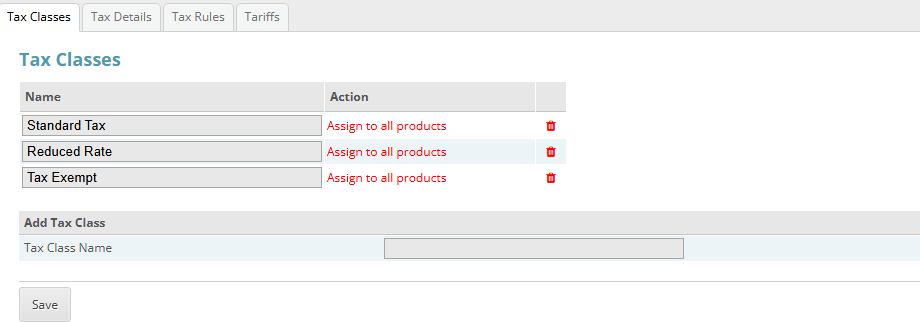
Tax settings are split across four tabs. Rounding behaviour is worth rechecking on all of them after an upgrade. Click for full sized image
- Upgrade on a staging copy first. For this area specifically, it is worth the extra step.
- Run test baskets and compare against the old version. Cover: a single item, several of the same item, a mixed tax rate basket, a basket with a percentage coupon, a basket with a fixed amount coupon, and a gift certificate covering part and then all of an order.
- Check a discount group customer’s price on a category page against the basket price. If they differ, you are on a version before 6.7.6.
- If you sell cross-border with inclusive pricing, test a destination with a different VAT rate to your own.
- Check your receipts show what you expect, now that inclusive totals appear on them.
- Tell your bookkeeper that tax calculation changed, and roughly when. A small step change in reported tax across an upgrade is much easier to explain in advance than to investigate six months later.
Which version to be on
6.7.6 or later. The tax work genuinely was not finished before then, and 6.7.6 contains the cross-border inclusive fix and the double-discount fix, both of which produce visibly wrong prices rather than penny discrepancies.
If you host your CubeCart store with us and want the upgrade run on a staging copy so you can check your tax figures before it goes live, get in touch.
