Hotlink Protection: Worth Enabling, Easy to Overdo
Hotlinking is when another website displays your images by linking directly to the file on your server, rather than hosting a copy themselves. Their page, their visitors, your bandwidth.
It is easy to block, and cPanel gives you a checkbox for it. It is also easy to block too much and quietly break your Google Images traffic and your social media previews, which is why this is worth five minutes of thought rather than a straight yes.
Why it is a problem
You pay for their traffic. Every visitor to their page downloads the image from your server. If a hotlinked product photo ends up on a busy forum or marketplace listing, that can be a meaningful amount of transfer.
It slows your site down. Those requests compete with your own customers for the same server resources.
Your product photography sells someone else’s products. This is the one that annoys shop owners most, and rightly. Competitors and marketplace sellers lifting your images is common.
You are trusting someone else’s page. Because the file is served from your domain, whatever appears in that image is associated with you. If a site hotlinking your images is one you would rather not be associated with, you have no control over the context.
How blocking works
When a browser requests an image that is being displayed on a page, it sends a Referer header naming the page it is displaying it on. Hotlink protection compares that header against a list of domains you permit, and refuses anything else.
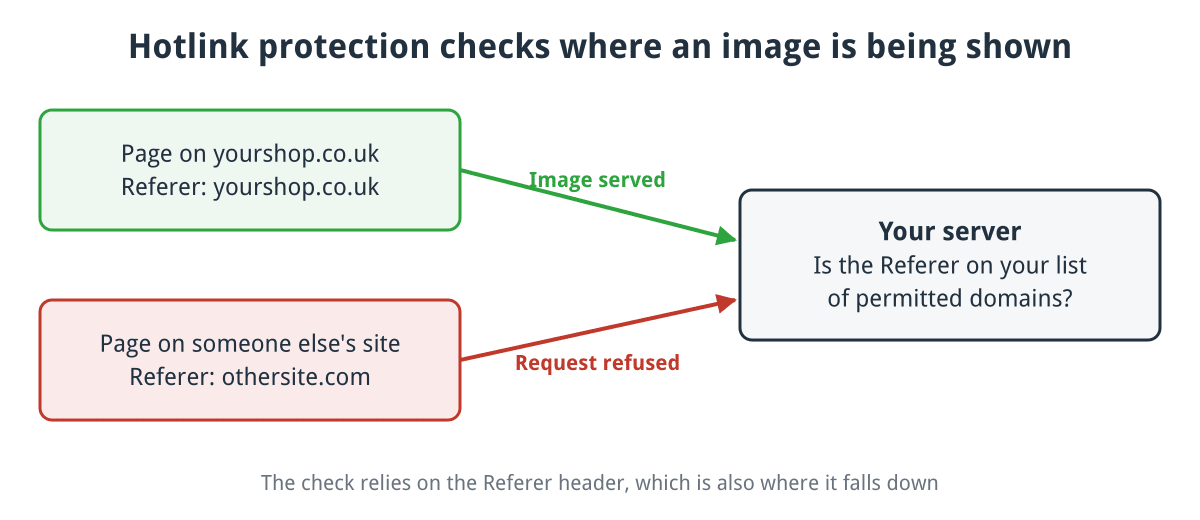
The server compares the Referer header against the domains you permit.
Click for full sized image
That mechanism explains both how effective it is and where it falls down, which we will come to.
Turning it on in cPanel
Under Security there is a Hotlink Protection tool.
- Check the URLs to allow access. cPanel pre-fills your own domains. Make sure every variation your site is served under is listed: with and without
www, and the HTTPS versions. - List the extensions to protect. Usually
jpg,jpeg,gif,png,webp,avif. Addpdf,zipormp4if you have files being taken. - Decide about direct requests. “Allow direct requests” permits access when there is no referer at all, which is what happens when someone types the image URL in, opens it in a new tab, or uses a browser or privacy tool that strips the header. Leave this ticked. Turning it off blocks a surprising number of legitimate visitors and gains you very little.
- Optionally set a redirect URL to send blocked requests somewhere, though the usual choice of a “please don’t hotlink” image is a novelty that ages badly.
Behind the scenes this writes rewrite rules into your .htaccess, which is worth knowing if you also edit that file by hand.
What you must allow, or you will break things
This is the part that gets skipped.
Search engines. If you want your images in Google Images, and for a shop you very much do, Google needs to fetch them. Blocking image crawlers removes an entire source of traffic.
Social media previews. When someone shares your product on Facebook, X, LinkedIn or WhatsApp, that platform fetches your image to build the preview card. Block it and your links share as a bare grey box.
Your own other domains. Marketing sites, landing pages, a separate blog.
Anything that emails your images. Order confirmations with a logo, newsletters. Mail clients often send no referer, which is another reason to allow direct requests.
Marketplaces you sell on, if their listings pull images from your site.
A CDN, if you use one. If your images are served through Cloudflare or similar, requests reaching your origin come from the CDN and the referer handling changes. Test properly rather than assuming.
Testing it
Do not just look at your own site, which will work regardless.
Fetch an image with a referer from another domain and check you get a 403:
curl -I -e "https://www.someothersite.com/" https://www.example.co.uk/images/product.jpgThen fetch it with no referer at all, which should succeed if you allowed direct requests:
curl -I https://www.example.co.uk/images/product.jpgThen check the things people forget: share a product URL into a private message on each social platform you use and confirm the preview image appears, and run a product page through Google’s Rich Results Test to confirm the image is reachable.
When not to bother
Hotlink protection solves a bandwidth problem. If you do not have a bandwidth problem, the main thing you get is a small risk of breaking your own image previews.
Check your traffic statistics before enabling it. If a handful of images account for a large share of your transfer, and the referers are sites that are not yours, you have a case. If your bandwidth is comfortable, this is optional.
It is also worth being clear about what it does not do. It stops someone displaying your image from your server. It does not stop them downloading your image and uploading their own copy, which is what a determined competitor will do. For that, the answer is a watermark on the images you care about, or a copyright complaint.
The short version
Enable it if your images are being taken and it is costing you. Allow direct requests. Allow search engines and social platforms explicitly. Test with curl and by sharing a link, not by loading your own site.
If you are on our website hosting and are not sure whether hotlinking is costing you anything, ask and we will look at your traffic and tell you either way.
