WordPress Cron Jobs: Why Your Scheduled Posts Do Not Publish
WordPress has a scheduling system, and it is not a cron job. That single misunderstanding is behind a large share of the “my scheduled post never published” and “my backups stopped running” problems we see.
It is worth ten minutes to understand and about two minutes to fix properly.
How WP-Cron actually works
A real cron job is run by the server on a timer, whether or not anyone is using the site. WP-Cron is not that.
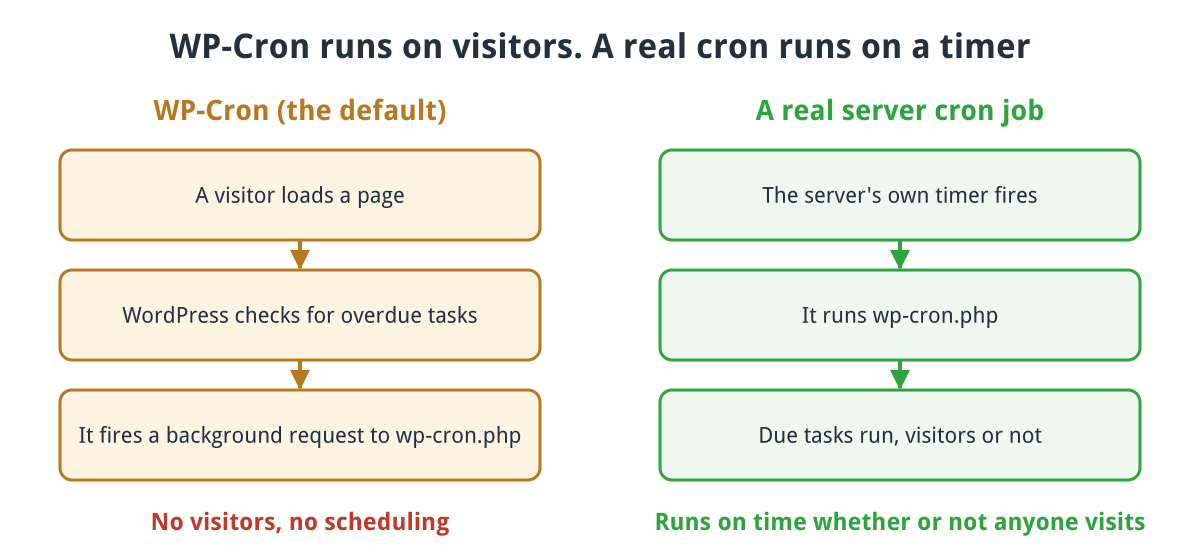
WP-Cron only runs when someone visits. A server cron job runs on time regardless.
Click for full sized image
WordPress keeps a list of due tasks in the database. On every page request, it checks whether anything is overdue, and if so it fires off a background request to wp-cron.php to run it.
So WordPress scheduling is powered by visitors. No visitors, no scheduling.
This design exists because WordPress cannot assume it has access to the server’s crontab, and on shared hosting that is a reasonable assumption. But it produces two opposite failure modes, and most sites suffer from one of them.
Failure one: a quiet site misses everything
If nobody visits between 2pm and 6pm, a task scheduled for 2pm runs at 6pm. A post scheduled to publish overnight publishes when the first person arrives in the morning.
WordPress even has a name for the resulting state: a post that missed its slot shows as Missed schedule.
A page cache makes this considerably worse, and a CDN worse still. Cached pages are served without PHP running, so they do not trigger the check. Put Cloudflare in front and a large share of your traffic never reaches your server at all. A site can look busy in its analytics while its origin sees very few requests, which is exactly the situation where scheduling silently stops.
We hit this ourselves recently on our own site. Plenty of traffic, a full page cache, Cloudflare in front, and a run of blog posts scheduled every two days that were depending on somebody happening to load an uncached page at the right moment.
Failure two: a busy site runs it far too often
The opposite problem. On a high traffic site the check runs on every single request, and under load WordPress can fire multiple overlapping wp-cron.php requests. Each one is a full WordPress bootstrap.
The result is measurable load doing nothing useful, and it gets worse precisely when the site is busiest. That includes traffic that is not visitors at all: when a WordPress site is being used in a DDoS attack, every junk request triggers the check as well, turning a small attack into a large load problem.
The fix
Two steps. Do them in this order, because doing the first without the second stops scheduling entirely.
1. Add a real cron job calling wp-cron.php on a timer. In cPanel, under Cron Jobs, every five minutes:
*/5 * * * * /usr/local/bin/php -q /home/username/public_html/wp-cron.php >/dev/null 2>&1Substitute your own account name and path. The redirect at the end matters: without it, any output becomes an email to you every five minutes.
Alternatively call it over HTTP, which is useful if PHP on the command line behaves differently to PHP on the web for your setup:
*/5 * * * * wget -q -O - "https://www.example.co.uk/wp-cron.php?doing_wp_cron" >/dev/null 2>&1Every five minutes suits most sites. Every fifteen is fine if nothing is time sensitive. Going below five rarely helps.
2. Then stop WordPress firing it on page requests. In wp-config.php, above the line that says it has stopped editing:
define('DISABLE_WP_CRON', true);Get the order right. Setting this without a working cron job means nothing scheduled ever runs again, including your backups, and you will not get an error to tell you.
If you are nervous, add the cron job first, confirm it is running, and add the constant a day later. Leaving both active is harmless, just slightly wasteful.
Checking what is scheduled
The plugin WP Crontrol shows every scheduled event, when it is next due, and what function it calls. It also lets you run one immediately, which is the fastest way to test something.
Things worth looking for:
Events with a next run in the past. That is a stuck schedule, and it usually means either WP-Cron is not firing or something errors every time it tries.
Events from plugins you removed. Deactivating a plugin does not always clear its scheduled tasks. They keep firing and failing.
Very frequent events. Anything scheduled every minute on a site that does not need it.
To test the mechanism itself from the command line:
php /home/username/public_html/wp-cron.php; echo "exit: $?"No output and exit 0 is what you want.
What depends on it
More than people expect, which is why silent failure is expensive:
- Scheduled posts publishing
- Automatic core, plugin and theme updates
- Backup plugins
- Transient cleanup, and much of what an SEO plugin does in the background
- Newsletter and email queue sending
- WooCommerce scheduled actions: subscription renewals, order status changes, stock synchronisation
- Social posting plugins
On a WooCommerce site this list becomes commercially serious. Action Scheduler, which WooCommerce uses, is driven by WP-Cron, so a stalled scheduler means renewals not taken and orders sitting in the wrong status.
A note on hosting
Some managed WordPress hosts already replace WP-Cron with a server-side equivalent, in which case there is nothing for you to do. Others do not, and shared hosting almost never does it for you.
If you are unsure, the quickest test is to schedule a post for five minutes’ time, close your browser, leave the site alone, and check afterwards whether it published on time.
The short version
WP-Cron depends on traffic, and page caching plus a CDN can remove most of that traffic from your origin without you noticing. Add a real cron job every five minutes, then set DISABLE_WP_CRON. In that order.
If you are on our WordPress hosting and want your scheduling moved onto a proper cron job, ask and we will set it up for you.
