Structured Data for E-Commerce: Getting Rich Results Right
Structured data is a block of machine readable information you add to a page describing what is on it: this is a product, it costs £24.99, it is in stock, it has 47 reviews averaging 4.6.
Search engines already try to work this out by reading your page. Structured data removes the guesswork, and in return you can qualify for rich results: the star ratings, prices and availability that appear under a search listing and make it considerably more clickable than the plain blue link above it.
Why it is worth the effort for a shop
Structured data is not a ranking factor. Google has been consistent about that. What it affects is click-through rate, and on a results page where you are competing with several other shops selling the same thing, that is often the more useful lever.
A listing showing a price, star rating and “In stock” occupies more vertical space and answers more of the searcher’s question before they click. It also feeds Google Merchant Center and the Shopping tab, and increasingly it is how AI-generated answers pick up product facts.
Use JSON-LD
There are three formats. Use JSON-LD.
It sits in a <script> block, usually in the head, entirely separate from your visible markup. Microdata and RDFa interleave attributes through your HTML, which means every template change risks breaking your structured data. Google recommends JSON-LD and it is far easier to maintain.
<script type="application/ld+json">
{
  "@context": "https://schema.org",
  "@type": "Product",
  "name": "Blue Widget",
  "sku": "BW-001",
  "description": "A blue widget for widget-related purposes.",
  "brand": { "@type": "Brand", "name": "Acme" },
  "offers": {
    "@type": "Offer",
    "url": "https://www.example.co.uk/blue-widget/",
    "priceCurrency": "GBP",
    "price": "24.99",
    "availability": "https://schema.org/InStock",
    "priceValidUntil": "2026-12-31"
  }
}
</script>
The fields that matter
For a product page, name, offers.price, offers.priceCurrency and offers.availability are the ones doing the work. Add sku and brand where you have them, and gtin if the product has a barcode, since that helps match your listing to the same product elsewhere.
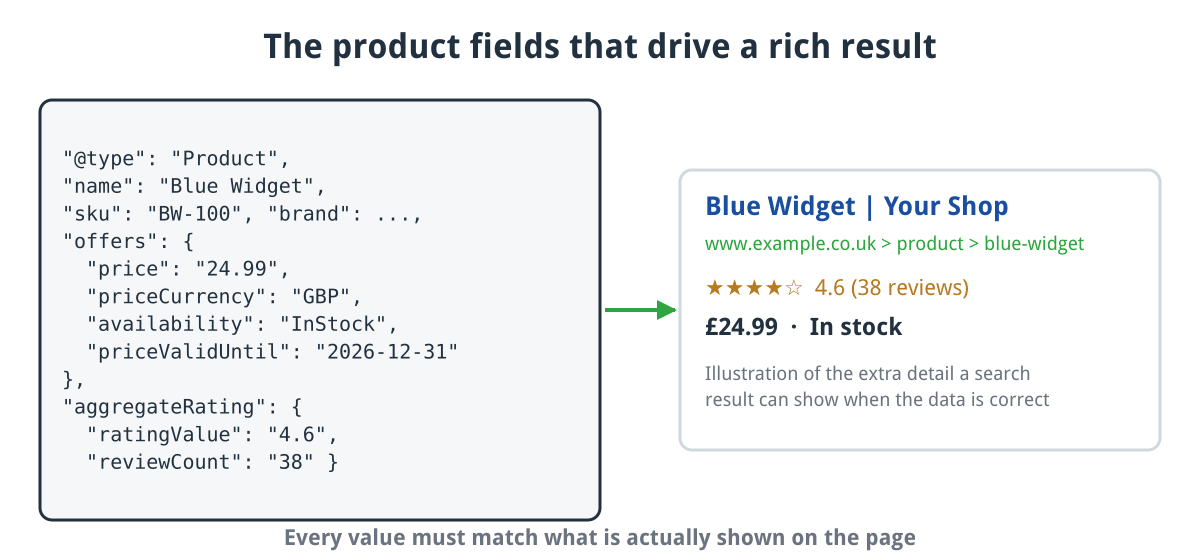
The product fields that do the work, and the kind of extra detail they can add to a search result.
Click for full sized image
priceValidUntil is worth setting. Without it, Google may treat the price as stale after a while and stop showing it.
For reviews, aggregateRating needs ratingValue and reviewCount. Both must reflect what is actually on the page.
The rules people break
It must match the visible page. This is the rule, and it is not negotiable. If your markup says £19.99 and the page says £24.99, that is a manual action risk. Same for stock status and review counts.
Do not mark up reviews you invented. Google’s policy requires ratings to come from genuine users and be visible on the page. Self-serving review markup, where a business rates itself, is explicitly disallowed.
Do not hardcode the rating. A surprisingly common bug is markup that always reports five stars regardless of actual reviews. CubeCart shipped exactly this bug and fixed it in 6.7.6. It is worth checking your own output rather than assuming.
Keep availability honest. Marking everything InStock because it is easier produces listings that send people to out-of-stock pages, which is worse than no markup.
Beyond products
Organization on your homepage: name, logo, URL, contact details, social profiles. This feeds the knowledge panel.
BreadcrumbList on category and product pages, so the results page shows your site structure rather than a raw URL.
FAQPage where you genuinely have questions and answers. Be aware Google reduced FAQ rich results substantially in 2023, so the visible benefit is smaller than it was.
LocalBusiness if you have a physical presence, with address and opening hours.
Testing it
Two tools, and use both.
Google’s Rich Results Test tells you whether a page qualifies for a rich result and what is missing. That is the one that matters commercially.
Schema.org’s validator checks whether your markup is valid schema, which is a broader question. A page can be valid schema and still not qualify for a rich result because Google wants specific fields.
Then watch the Enhancements section of Google Search Console, which reports errors across your whole site rather than one page at a time. That is where you will spot a template change that broke markup on four hundred product pages.
CubeCart specifics
CubeCart outputs JSON-LD for products out of the box, and recent releases fixed several real problems worth knowing about: descriptions are now trimmed to the 5,000 character limit rather than being rejected for length, the optional priceValidUntil field was added, the description markup was corrected, and the hardcoded five star review rating was fixed in 6.7.6.
Order confirmation emails also carry schema.org markup now, which is what produces the richer order summary cards some mail clients display.
If you are on an older release, test a product page before assuming your markup is fine.
Where to start
Test one product page, one category page and your homepage in the Rich Results Test. Fix whatever it flags, then check Search Console’s Enhancements report a week later to see the picture across the whole site.
Structured data works best on top of the basics. If search engines are not reliably finding your product pages to begin with, marking them up achieves very little, so it is worth reading alongside our guide to XML sitemaps.
It is an afternoon of work for a permanent improvement in how your listings appear. If you host with us and want a hand checking what your store is currently outputting, get in touch.
