404 Errors and Custom Error Pages for Your Shop
A customer asked us recently about 404 errors appearing in Search Console and what to do about them. It is a good question with a slightly unsatisfying answer, because most of those 404s want leaving alone, and the ones that matter are usually not the ones people worry about.
Here is how to tell the difference, and how to make sure the ones you cannot avoid do not cost you a sale.
A 404 is not a fault
The first thing to understand is that 404 is a correct answer. It means “there is nothing here”, and when there genuinely is nothing there, that is what your server should say.
Google has been clear for years that 404s do not harm your rankings. Pages go away. Products get discontinued. Links get typed wrong. A site with no 404s at all would be a strange thing.
What matters is which URLs are 404ing and how you handle them.
Sorting the ones that matter
Search Console lists them under Pages, as “Not found (404)”. Click through and look at where each URL was linked from.
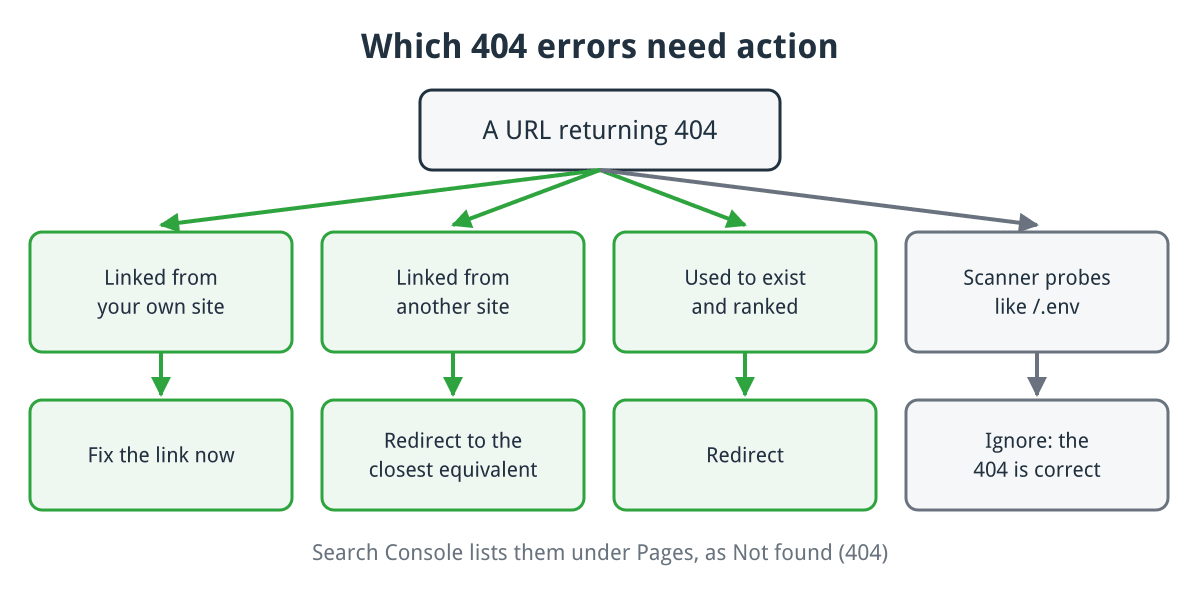
Most 404s need one of three responses, and scanner noise needs none.
Click for full sized image
Linked from your own site: fix immediately. An internal link to a page that does not exist is your bug. It wastes crawl effort and sends customers into a dead end.
Linked from another site: usually redirect. Someone has linked to you and the link is broken. That is inbound traffic and reputation you are throwing away. Redirect it to the closest equivalent page.
A URL that used to exist and ranked: redirect. Discontinued products are the classic case for a shop.
Nonsense URLs: ignore. Scanners probe for /wp-login.php, /admin, /.env and hundreds of others on every site on the internet. Those 404s are correct and there is nothing to do.
The discontinued product question
This is the one shops get wrong most often, usually by redirecting everything to the homepage.
Do not do that. A customer looking for a specific product does not want your homepage, and search engines treat a mass redirect to the homepage as a soft 404 anyway, so you gain nothing.
Better options, in order of preference:
Redirect to a genuine replacement if you sell one. A 301 to the successor product is the best outcome for everyone.
Redirect to the category if there is no direct replacement but you sell similar things. The customer lands somewhere useful.
Keep the page and mark it unavailable if the product might return, or if the page has links and rankings worth preserving. Show it as out of stock with alternatives, and keep your structured data honest about availability.
Return 410 Gone if it is never coming back and there is nothing similar. This tells search engines to drop it faster than a 404 does. It is the right answer more often than people realise.
Soft 404s: the ones actually worth worrying about
A soft 404 is a page that says “not found” to a human while telling the browser everything is fine with a 200 status.
This is genuinely harmful, because search engines cannot tell the page is empty and will keep crawling and indexing it. On shops it usually comes from empty category pages, out of stock products that render a bare template, or search result pages with no results.
Search Console reports these separately as “Soft 404”. Unlike ordinary 404s, they are worth clearing.
Make your 404 page do a job
Since some 404s are unavoidable, the page a visitor lands on is the part you control. A default server error page loses the sale.
A good one, in rough order of value:
- Looks like your site. Same header, navigation, branding. A bare error page looks broken and people leave.
- Explains plainly that the page does not exist, without jargon or a status code as the headline.
- Has a search box. This is the single most useful element, because most people arriving here were looking for something specific.
- Links to your main categories and your bestsellers.
- Offers a way to ask. A contact link converts a dead end into an enquiry.
Keep it genuinely useful rather than clever. Humorous 404 pages are a well worn idea and they do not help someone who cannot find what they came for.
Setting it up
In cPanel there is an Error Pages tool that lets you edit the pages for common status codes per domain. Straightforward, and fine for a static site.
Via .htaccess, pointing at a file or a path your application handles:
ErrorDocument 404 /404.htmlUse a leading slash and a path relative to your document root. A full URL causes the server to issue a redirect, which turns your 404 into a 302 and defeats the point.
In CubeCart, the storefront handles missing products and categories itself, so the page customers see comes from your skin rather than from Apache. The template lives in your skin’s template directory, and editing it means the error page keeps your store’s layout, navigation and search box automatically. Keep a copy of your changes somewhere outside the skin folder so a skin update does not quietly lose them.
In WordPress, the theme’s 404.php template does the same job. Child themes are the right place to customise it so an update does not overwrite your work.
Checking it works
Two things to verify, and the second catches people out:
- Visit a made-up URL on your site and confirm you get your custom page.
- Confirm it returns a real 404 status. Your browser will not show you this. Use your browser’s network tab, or from a terminal:
curl -I https://www.example.co.uk/this-does-not-existYou want HTTP/2 404. If it says 200, you have built a soft 404 and made things worse rather than better.
The short version
Ignore 404s from scanners and typos. Redirect the ones with inbound links or previous rankings, to a relevant page rather than the homepage. Use 410 for things that are genuinely gone. Clear any soft 404s. And make sure the page people actually land on has a search box and looks like your site.
If you run a CubeCart store with us and want a hand setting up a custom error page or working through a Search Console list, just ask.
