The CubeCart Image Picker Rewrite: Small Change, Big Time Saving
CubeCart 6.7.0 rewrote the image picker as a shared component used everywhere images are selected, with a follow up fix in 6.7.2 that removes one of the most tedious steps in adding a product. This is not a headline feature, and it is probably the change that will save you the most time day to day.
The problem it solves
Adding images to products is one of the highest volume tasks in running a shop. It is also where the old interface was weakest: different image selection behaviour in different places, no way to search, and an upload flow that dropped you back at the top of the page with the newly uploaded file still needing to be found and assigned manually.
None of that is dramatic. All of it is friction, repeated hundreds of times.
What changed
One component, used everywhere. The rewrite (admin/skins/default/js/image-picker.js and element.image_picker.php) is shared across products, categories, gift certificates, CKEditor and a new digital files mode. Learn it once and it behaves the same wherever you meet it.
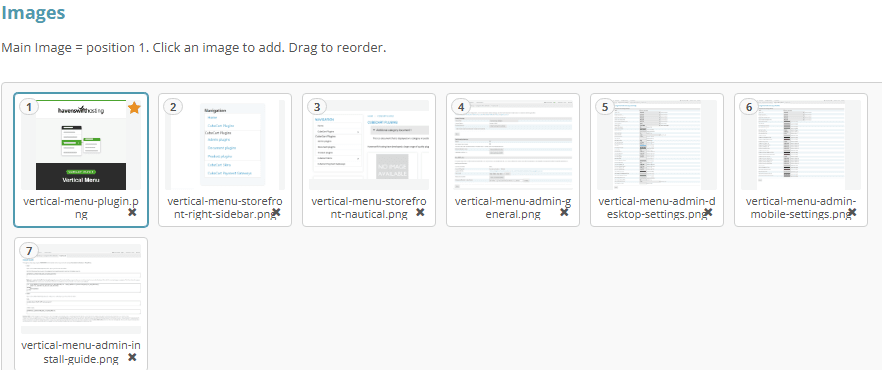
Assigned images are numbered, position 1 is the main image, and they can be dragged into a different order.
Click for full sized image
Auto-select on upload (6.7.2). This is the one. Upload an image on the product add or edit page and it is now selected automatically. No scrolling back down to find the file you just uploaded and assign it by hand. If you add products regularly, this alone justifies the upgrade.
Image search across the file manager. Once you have a few thousand images, browsing is not a viable way to find one. Search is.
Bulk image pre-fetch on product listings, which makes the product list load noticeably faster on image-heavy catalogues.
Per-option product images assignable from the new options grid. If you sell a product in six colours, each variant can have its own image, assigned from the same place you manage the options.
Responsive product images with srcset and sizes, so browsers download an appropriately sized image rather than a desktop-sized one on a phone. That is a page speed and mobile data improvement your customers get without you doing anything.
File manager layout improvements: the edit screen now shows a preview tile and metadata side by side, and the digital files tab is integrated with the new picker.
Related image handling changes
6.6.0 added a toggle for image output format between WebP, PNG and JPEG. WebP is meaningfully smaller than JPEG at equivalent quality and is supported by every current browser, so it is usually the right choice for a storefront. Image weight is normally the single largest factor in how fast a shop feels, so this is worth reading alongside our guide to website speed optimisation. Keep the option in mind if you ever need to rule out an image rendering problem.
6.6.0 also fixed image uploads failing silently in Firefox, and fixed image attributes not updating on change.
6.6.3 fixed the image cache writing malformed .500 files when a source filename had no extension.
6.7.5 improved image upload handling and removed the redundant image_upload_format setting.
6.7.6 fixed two irritations: orphaned product_id = 0 images no longer appear on the Add Product page, and the file manager no longer reports “Not enough memory to create thumbnail” for non-image files sitting in images/source.
One security note
Image upload is a classic attack surface, because an upload form that does not validate properly is a way to put a file on your server. CubeCart 6.7.0 fixed exactly this: GHSA-652f-8c88-25cx, an authenticated arbitrary file upload leading to remote code execution through the REST API’s files endpoint.
Part of that fix was a defence in depth .htaccess placed in images/source/, which stops the web server executing anything that ends up in there regardless of how it arrived. If you have ever moved or restored an images directory manually, check that file is still present. It is easy to lose in a migration and it is doing real work.
Practical suggestions
Name your image files usefully before you upload them. Now that the file manager has search, filenames are how you find things. blue-widget-large-front.jpg is findable; IMG_4471.jpg is not.
Use per-option images if you sell variants. Showing the actual colour a customer selected reduces returns, and returns cost more than the effort of assigning the images.
Check your image output format. If you are still serving JPEG everywhere, switching to WebP is a straightforward page speed win.
Tidy images/source. Non-image files sitting in there caused thumbnail errors before 6.7.6 and are not doing anything useful now.
If you host your CubeCart store with us and want a hand with image optimisation, or want us to confirm the protective .htaccess files are in place after a migration, get in touch.
