CubeCart Abandoned Cart Recovery: Setting It Up Properly
Abandoned cart recovery arrived in CubeCart 6.6.0, was capped sensibly in 6.6.1, gained reporting in 6.7.0, stability work in 6.7.4, and had its most important bug fixed in 6.7.6. It is probably the highest return feature added in this whole run of releases, and it is off by default.
The commercial case
Cart abandonment in retail typically runs around 70 percent. Whatever your exact figure, most people who put something in a basket do not buy it, and most of them are not lost causes: they were interrupted, they were comparing prices, they wanted to check the delivery cost, or they meant to come back and forgot.
A follow up email addresses the last category directly, and the economics are unusually good because you are marketing to people who already chose a specific product. You are not buying attention, you are recovering it.
How it works in CubeCart
Recovery is driven by the sendAbandonmentEmails scheduled task, which ships disabled with a default frequency of one hour. You enable it under Scheduled Tasks.
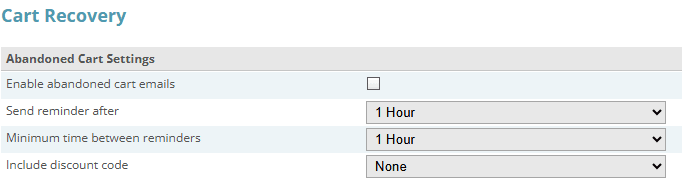
The Cart Recovery tab in Store Settings. The Send Cart Abandonment Emails scheduled task has to be enabled as well, or nothing is sent.
Click for full sized image
The email is built from the customer’s saved cart: their name, the store name, the item count, the products with options and images, and a recovery link that returns them to their basket. There is also an opt-out link, and support for including a coupon code and description if you want to incentivise the return.
That coupon capability is worth thinking about carefully rather than switching on reflexively. If you always send a discount with the reminder, you train regular customers to abandon deliberately. A plain reminder first, with any incentive reserved for a second contact or higher value baskets, is usually the better commercial call.
The limits added in 6.6.1
The original 6.6.0 implementation had no maximum cart age and no per-cart send limit, which meant it could email somebody about a basket they abandoned months ago, repeatedly. 6.6.1 added both a maximum age cutoff and a one email per cart limit, by default.
This is the correct behaviour and it also matters for compliance. Repeatedly emailing someone about a months-old basket is the sort of thing that generates complaints rather than orders. If you are running 6.6.0 exactly, you do not have these caps.
The 6.7.6 fix: reminders to customers who had already paid
This is the one to know about. Until 6.7.6, abandoned cart reminders could be sent to customers who had already completed and paid for their order.
The cause was that saved carts were only cleared when the shopper returned to the receipt page, and the suppression check was anchored to session activity rather than to the cart. A customer who paid and then closed the tab, or whose session ended before the receipt loaded, still had a live saved cart as far as the system was concerned. So they got an email asking them to come back and complete a purchase they had already made.
From a customer’s point of view this is worse than not sending anything. It reads as either incompetence or, worse, as a suggestion that their payment did not go through. 6.7.6 clears saved carts when payment lands, and anchors the suppression check to the cart itself.
If you turned abandoned cart emails on before 6.7.6 and got confused or annoyed replies, this was why. If you turned them on, got complaints, and turned them off again, it is worth trying once more on the current release.
Measuring it
6.7.0 added an Abandoned Carts report to the statistics suite, and 6.6.3 put abandoned cart statistics on the dashboard. Together these let you see the size of the problem and whether the emails are moving it.
What to watch: the number of abandoned carts, and the recovery rate on the emails you send. If you enable recovery emails, note your baseline abandonment figure first so you have something to compare against. Turning a feature on and then having no idea whether it worked is a common and avoidable outcome.
Make sure it actually runs
Like everything on CubeCart’s scheduled task system, this depends on cron. If your scheduled tasks are triggered only by web traffic, then on a quiet store the abandonment emails go out whenever somebody happens to visit, which is exactly the wrong timing characteristic for a feature whose whole value is being timely. WordPress users will recognise the pattern: WP-Cron works the same way, and fails the same way on a quiet site.
Use the CLI cron runner added in 6.7.4 (cli/cron.php) as a real server cron entry. 6.7.4 also added stability improvements and test coverage to the cron-driven recovery flow.
A sensible setup
- Upgrade to the current release. The 6.7.6 already-paid fix alone justifies it.
- Set up a real cron entry calling
cli/cron.php. - Note your current abandonment rate from the dashboard.
- Enable
sendAbandonmentEmails, leaving the age cutoff and one-per-cart limit in place. - Preview the email template in the back office and check it reads the way you would want to receive it.
- Start without a coupon. Add one later if the plain reminder underperforms.
- Check the Abandoned Carts report after a few weeks against your baseline.
If you host your CubeCart store with us and want the cron entry set up so this fires reliably, get in touch.
