CubeCart and Elasticsearch: Better Relevance, and the Failure to Watch For
CubeCart’s Elasticsearch integration was improved substantially in 6.6.0 and 6.6.3, hardened in 6.7.2 and 6.7.4, and had three further fixes in 6.7.6. If your store has a catalogue large enough to justify Elasticsearch, these changes affect what your customers find.
Why search relevance is worth caring about
Site search is used by a minority of visitors and converts far better than browsing, because someone typing a product name has already decided what they want. Search that returns the wrong thing, or nothing, loses a customer who was ready to buy.
CubeCart’s built in search is adequate on a small catalogue. Elasticsearch becomes worth the extra infrastructure once you have enough products that relevance ordering matters, or enough traffic that search performance does.
The 6.6.3 relevance work
Six changes, and together they alter result ordering enough that you should test after upgrading:
- Indexing strategy and search relevance reworked.
- Reindex now uses the bulk API. Substantially faster rebuilds on a large catalogue. If you previously avoided reindexing because it took too long, try again.
- Search considers a product’s primary category and boosts the product name field. This is the change most likely to visibly improve results. Matching the product name should outrank matching a word buried in a description, and now it does.
nameandproduct_nameconsolidated into a single multi-field mapping. Two fields holding effectively the same data, scored separately, is a long standing source of inconsistent ranking. Removing the duplication makes scoring predictable.- Category included in search-as-you-type results.
- The NaN count on the indexer page fixed.
Reliability fixes
6.6.0 made Elasticsearch work without authentication and added an API key authentication option, which matters because managed Elasticsearch providers vary in what they expect. It also made indexes rebuild automatically when needed.
6.7.2 moved the handler to static configuration and added a clean fallback when the cluster is unreachable. That fallback is important: without it, an Elasticsearch outage takes your search down. With it, search degrades rather than failing.
6.7.4 added further robustness to the Elasticsearch and Searchly handlers.
6.7.6 fixed three specific faults: a fatal error on page=all, stock exclusion not working, and empty documents being indexed. It also updated the Elasticsearch client dependencies.
The failure mode to watch for
That last one, empty documents being indexed, deserves attention because it is the characteristic way an Elasticsearch setup goes wrong quietly.
The symptom is that a reindex reports success but produces far fewer documents than you have products, or documents with no useful content in them. Search then returns almost nothing, and because the indexer said it worked, the problem looks like a relevance issue rather than an indexing failure.
After any reindex, check the document count against your product count. If your store has 4,000 products and the indexer shows 26 documents, you do not have a tuning problem, you have an indexing problem, and no amount of relevance adjustment will help. This is worth making a habit of, because it takes ten seconds and it is the difference between spotting it immediately and discovering it from a drop in sales.
What to do after upgrading
- Run a full reindex. The mapping changed in 6.6.3, so an index built on an older version is not laid out the way the current code expects.
- Check the document count against your live product count. As above.
- Test your top twenty search terms. Take them from the Search Terms report added in 6.7.0. Compare what comes back now with what you would expect. The name boosting should be a visible improvement.
- Test search-as-you-type, which now includes categories.
- Test with Elasticsearch stopped, if you can do so safely on a staging copy, and confirm your store degrades gracefully rather than erroring.
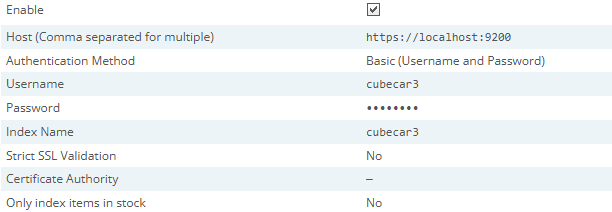
The Elasticsearch section of the Advanced settings tab. The connection details themselves are set in includes/global.inc.php.
Click for full sized image
Do you need Elasticsearch at all?
Worth asking. It is another service to run, monitor and keep updated, and it has its own failure modes. On a catalogue of a few hundred products, CubeCart’s built in search is usually fine and the operational simplicity is worth more.
It earns its place when you have thousands of products, when relevance ordering genuinely affects what people find, or when search volume is high enough that database search performance shows. If you are not sure which side of that line you are on, the Search Terms report will tell you: high search usage with poor conversion on search is the signal.
Also relevant on the performance side: 6.7.6 removed ORDER BY RAND() from the Featured Products box, replacing it with a random primary key pivot. On a large catalogue that is a significant improvement, because ORDER BY RAND() forces the database to sort the whole table to pick one row. It also fixed lock wait timeout errors on the CubeCart_search hit counter under concurrent traffic.
If you host your CubeCart store with us and want a hand deciding whether Elasticsearch is worth it for your catalogue, or diagnosing an index that is not populating properly, get in touch.
